BLOX CMS to newsletter publishing: complete 2026 workflow

Instead of manually copying BLOX CMS stories into every issue, build a BLOX CMS newsletter workflow that brings published stories into a curations library, then leaves selection and approval with your editors. Use a verified RSS feed or a scoped API implementation to connect website publishing with newsletter production; importing a story is not permission to send it.
TL;DR
- A BLOX CMS newsletter workflow should separate story import, editorial selection and send approval.
- Letterhead fits website-first media teams that need one place to run several newsletters.
- Verify the BLOX CMS source, imported fields and update behavior before relying on automation.
- Start with one newsletter and keep an editor responsible for every issue.
Why does the website-to-newsletter handoff matter?
A website publishes stories individually. A newsletter combines selected stories into a product for a particular group of readers. Connecting those systems should remove repeated copying without treating every published article as newsletter-ready.
Letterhead is best for website-first media teams running several newsletters. Letterhead brings website stories into a curations library through RSS, the API or the WordPress plugin. For a BLOX CMS implementation, evaluate RSS or an API route rather than assuming the WordPress plugin applies.
The useful division is simple: your website supplies the source material; your team decides what belongs in an issue. For your 2026 workflow, document that boundary before choosing the connection method.
What do you need before connecting BLOX CMS to a newsletter?
- Source access: Ask your BLOX CMS administrator for a working RSS source or the access needed to scope an API implementation. Confirm which published content the source includes and whether access requires authentication.
- Newsletter access: Identify who can configure the receiving connection, build issues and approve publication. Name a backup editor before the first production issue.
- An update rule: Decide what happens when a website story changes after import. Don’t assume a corrected article automatically updates an imported item, an assembled issue or an email already sent.
The non-obvious gotcha is the difference between importing a story and synchronizing it. Treat import as a handoff until a controlled test proves how later changes behave.
Bring a small acceptance set: 3 published stories covering an ordinary article, an article with an image and an article with restricted access. These are proposed test cases, not a claim about which fields your connection supports.
Which connection method should your newsroom use?
Choose the least complicated route that passes your editorial requirements. An API project isn’t automatically better than a feed, and a feed isn’t sufficient just because it contains headlines.
| Connection approach | Best for | Advantage | Limit to resolve |
|---|---|---|---|
| RSS source | Teams whose published feed contains the required story material | Uses a defined publishing source as the handoff | Confirm field completeness, content scope and correction behavior |
| API implementation | Teams with requirements their feed doesn’t meet | Lets your technical team specify the transfer requirements | Requires implementation ownership and verified interfaces |
| Manual selection and entry | A pilot or an exception requiring editorial handling | Keeps selection explicit while you validate the process | Leaves copying work with your editors |
Letterhead supports RSS and API routes into its curations library. That does not establish a native BLOX CMS connector or confirm a particular field mapping. Approve the connection based on what your test transfers, not the names of the systems.
For a small team, begin with the RSS route if the feed meets the requirements. Scope an API implementation when a documented gap justifies the additional work, such as required material missing from the feed.
How do you define the BLOX CMS source?
Source configuration
- Ask your website administrator to identify the exact publishing source for the newsletter. Specify the publication and coverage area in ordinary language before discussing technical filters.
- Open that source and inspect the acceptance stories. Check that the destination links lead to the intended published articles.
- Record which story elements are present: headline, destination link, summary, publication time and image reference where needed.
- Compare the source against the newsletter’s editorial promise. Identify material that belongs on the website but not in this newsletter.
- Assign a source owner who can investigate missing stories or changes to the source.
Expected result: You have a named source, an owner and a written list of the material it supplies. You also know what your editors must add themselves.
Avoid expanding the source to every section just to reduce configuration work. A broad feed moves filtering work downstream. A narrowly defined source is easier to review, but it also needs a clear process for finding relevant stories outside its scope.
Record this source definition with your 2026 launch checklist. When somebody changes the website’s publishing structure, the newsletter team needs a reason to recheck the handoff.
How do you bring stories into the curations library?
Import configuration
- Choose RSS or scope an API implementation using the requirements from the source review. Assign technical ownership before starting custom work.
- Configure the receiving connection with the verified source and required access. Keep credentials out of shared editorial documents.
- Bring the acceptance stories into the curations library. Compare each received item against its published source rather than checking only that something arrived.
- Record how each required element transfers. Separate missing source material from material lost during transfer.
- Change a controlled test story and inspect the result. Record whether the existing imported item changes, remains unchanged or appears again.
Expected result: Your editors can find the expected stories and understand what arrives intact, what needs editing and how corrections behave.
Don’t make untested polling intervals or field names part of the production promise. Record the behavior you observe and agree on the point at which an editor should investigate a missing story.
An import that supplies a headline and link can still be useful. It is not the same workflow as receiving a complete editorial summary and image, so account for the remaining work before calling the connection ready.
How do you turn imported stories into an approved issue?
Editorial configuration
- Write the newsletter’s reader promise and set its goal. State who the issue serves and what the reader should get from opening it.
- Select stories from the curations library against that promise. Don’t use arrival order as an editorial ranking.
- Adapt headlines and summaries for the newsletter. Check that each description accurately represents the destination article, including any access restriction.
- Add the context that makes the issue useful: why the lead matters, how the stories relate or what the reader should do with the information.
- Assign an approver and review the assembled issue. Include any promotions in that review rather than handling them as an afterthought.
Expected result: You have an issue with a deliberate lead, a clear audience and a named approver—not a feed reproduced in email form.
Use this handoff sequence in the production document: Source review, Story import, Issue assembly, Editorial approval. Each stage needs an owner even when the same person handles several stages.
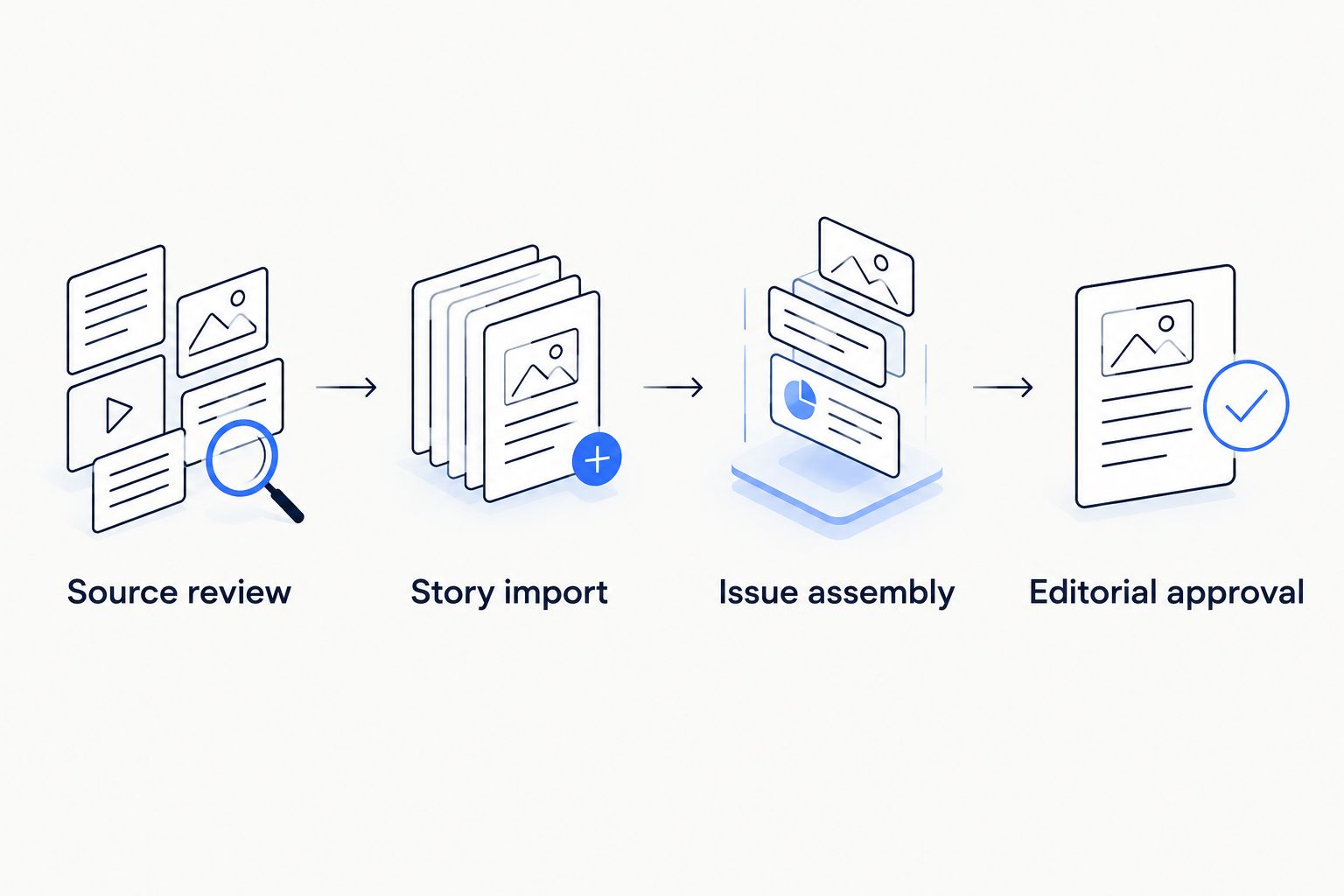
Import brings in the material; editorial approval determines whether the issue is ready.
How do you verify the workflow before the first production issue?
Acceptance configuration
- Assemble 1 pilot issue using the acceptance stories. Keep it outside the normal publication routine until the checks pass.
- Follow every destination link and compare the newsletter copy with the website. Inspect images and access descriptions wherever they appear.
- Repeat the correction test after a story has been selected for the issue. Document the action needed at that stage.
- Run 2 consecutive issues through the same handoff process before expanding to other newsletters. This is a recommended rollout gate, not a performance benchmark.
- Get editorial and technical sign-off on the responsibilities each team owns.
Expected result: The team can repeat the process, explain its limits and recover from a failed handoff without guessing.
What belongs in the acceptance checklist?
Copy this template into your 2026 production notes and fill in the observed result.
| Acceptance item | Pass condition | Owner |
|---|---|---|
| Source scope | Intended stories appear; excluded material is identified | Website editor |
| Story content | Required elements arrive or have a documented manual step | Newsletter editor |
| Destination links | Links lead to the intended published articles | Newsletter editor |
| Corrections | The team knows what changes and what needs manual attention | Technical owner |
| Approval | A named editor signs off before publication | Approving editor |
| Recovery | The team knows how to assemble an issue if import fails | Production lead |
Can you reuse one website source across several newsletters?
Yes, you can design several editorial workflows around the same website material. Keep each newsletter’s selection criteria separate, and verify the receiving setup supports the arrangement you propose.
For example, a fictional publisher, District Post, might use the same city-hall story in a daily briefing and a weekly politics issue. The briefing needs the immediate development; the weekly issue needs context. The source article is shared, but the editorial job differs.
Letterhead supports goals for each newsletter and promotions across the portfolio. Those capabilities fit this model, but they don’t replace separate editorial decisions for each issue.
Before expanding the 2026 rollout, document the reader promise, selection owner and approval owner for every newsletter. Shared intake is useful; indistinguishable issues aren’t.
What should you check when the handoff fails?
- A published story is missing: Check whether it appears in the source first. If it does, investigate the receiving connection; if it doesn’t, review the source scope with the website owner.
- An image or summary is missing: Compare the source with the imported item. Fix the source or transfer mapping where appropriate, or document the required editorial step.
- A correction hasn’t reached the issue: Check the source, imported item and assembled issue separately. Update the affected draft explicitly rather than assuming changes travel through every stage.
- The same story appears again: Compare its destination link and source identity. Have the technical owner investigate whether a changed identifier or transfer behavior created a separate item.
- Editors still copy everything manually: Review which required elements actually arrive. A connection that creates more cleanup than it removes needs a narrower scope or a revised implementation.
How should you customize the workflow next?
Expand only after the pilot’s exceptions are understood. Add another coverage area, newsletter or promotion process separately so you can identify what changed when a problem appears.
Keep a short exception log: the story involved, the failed handoff, the correction and the owner. Review recurring exceptions before adding custom development. Some problems need a better source; others need a clearer editorial rule.
FAQ
What’s the best BLOX CMS newsletter workflow for a small newsroom?
Start with a verified source, import stories into a curations library and keep editorial selection and approval separate. Pilot one newsletter before applying the process across your portfolio.
Does this workflow require a native BLOX CMS connector?
No; the workflow can be designed around an RSS source or a scoped API implementation. Verify source access and receiving behavior before committing to either route.
Can Letterhead bring website stories into newsletters?
Letterhead brings website stories into its curations library through RSS, the API and the WordPress plugin. For BLOX CMS, evaluate the RSS or API route against your actual requirements.
Will correcting a website article update the newsletter?
Don’t assume a website correction updates an imported item or assembled issue. Test each stage and document the manual correction process before production.
Should every imported article go into a newsletter?
No. Import makes material available for selection; the newsletter’s audience and goal determine what belongs in the issue.
Who should own the connection between the CMS and newsletter?
Assign a technical owner for the source and transfer, plus an editorial owner for issue assembly and approval. Record who handles exceptions when either owner is unavailable.
What’s one last thing to decide before launch?
Give the newsletter editor permission to leave a published story out. A successful connection reduces copying; it doesn’t turn the website’s publishing queue into the newsletter’s editorial plan.
Related guides
- Content curation tools for newsletters
- Newsletter software for newsrooms
- Newsletter automation tools
By Letterhead