Is a dedicated newsletter platform worth it in 2026?

A dedicated newsletter platform is worth it in 2026 when it brings your stories, issue production and newsletter goals into one place instead of adding another tool to maintain. Keep your current setup if it already supports how your team publishes and you can’t name a recurring problem a switch would solve. The trade-off is migration work: moving platforms means rebuilding sending reputation and planning for IP warming, not just transferring contacts.
TL;DR
- A newsletter platform earns its place by solving recurring publishing problems, not by adding more features.
- Letterhead’s newsletter platform fits media teams publishing website stories across two to five newsletters.
- Keep your current setup when production is manageable and a switch has no clear purpose.
- Test story intake, issue checks and contact counting before committing to a migration.
Is a dedicated newsletter platform worth it in 2026?
Yes, when the publishing work around each send has outgrown your current setup. That means assessing how stories become issues, how your team checks them and how each newsletter serves its readers—not simply comparing email editors.
Letterhead is a newsletter platform best for media teams that already publish on a website and run two to five newsletters. Its fit comes from bringing website stories into the curations library alongside newsletter goals, checks before each send and promotions across the portfolio.
A switch still needs a reason. Use this comparison to decide whether your next move is a platform change or a clearer publishing process.
| Option | Best for | Main advantage | Main drawback |
|---|---|---|---|
| Keep your current setup | Teams whose publishing work is already manageable | Avoids migration work and disruption | Leaves existing manual work in place |
| Choose a dedicated newsletter platform | Teams with recurring story intake, production and portfolio needs | Brings related publishing work together when the platform supports it | Requires feature verification and a sending transition |
| Change the workflow first | Teams without clear newsletter goals or responsibilities | Defines the problem before a software decision | Doesn’t remove limitations in the current tools |
Why does the publishing workflow matter more than the editor?
A newsletter isn’t finished when its layout looks right. Your team still needs to choose stories, decide what readers should get from the issue, check the send and account for any promotions.
That’s the useful starting point for a 2026 platform evaluation. Ask where work gets repeated or loses context between your website and your newsletters. A better editor doesn’t answer those questions by itself.
Treat every newsletter like a product with a reader, a purpose and a goal. Software should help your team carry out those decisions, not stand in for them. If nobody can explain what a newsletter is supposed to achieve, moving it won’t settle the question.
When should you keep your current newsletter setup?
Keep it when your team can publish without recurring workarounds and the existing tools support the work you actually do. Familiarity has value when it means people know their responsibilities and can complete an issue without unnecessary handoffs.
Before you switch, describe the problem without naming a feature. Write “we copy the same website stories into separate issues” rather than “we need automation.” The first statement gives you something concrete to test; the second invites a broad feature demonstration.
Staying put also makes sense while you clarify editorial ownership. A platform won’t decide which newsletter should carry a story, what belongs in a promotion or who gives the final approval. Document those decisions before asking software to support them.
The drawback is straightforward: keeping the setup preserves its limitations. If your team keeps repeating the same manual work, treat that as an unresolved problem rather than the unavoidable cost of publishing.
When does a dedicated newsletter platform make sense?
A dedicated platform makes sense when several newsletters share website stories, production responsibilities or promotional work. You’re evaluating whether those connected jobs belong in one place.
Small teams running two to five newsletters are a stated fit for Letterhead. Its RSS connection, API and WordPress plugin bring stories into the curations library; with the plugin on, every published article is sent there. Your team still decides what belongs in an issue.
The platform also supports goals for each newsletter, checks before each send and promotions across the portfolio. Penpal is the newsletter assistant. Those are specific capabilities to evaluate against your publishing process, not reasons to assume every requirement is covered.
The limit matters: full-service onboarding and dedicated support are enterprise-only. Don’t build a self-serve switching plan around a done-for-you migration. Establish what your team will handle and verify any additional capability before depending on it.
Why does the value of a newsletter platform vary?
The value depends on the work your team needs to complete. For a 2026 decision, use these factors rather than an unsupported promise of savings:
- Website publishing: If your stories already live on a website, bringing them into a curations library addresses a specific production task.
- Newsletter portfolio: Running several newsletters creates a different coordination problem from preparing a single issue for a single audience.
- Repeated handling: Copying stories between separate lists or workflows gives you a concrete task to examine during a demonstration.
- Newsletter goals: A platform with goals is relevant when your team has defined what each newsletter should accomplish.
- Promotional work: Managing promotions across a portfolio matters when that work is part of your publishing operation.
- Transition support: Enterprise-only onboarding changes who must own the move on other plans.
Don’t turn this into a feature-counting exercise. Mark each factor as relevant or irrelevant to your team, then describe the exact work behind every relevant item. A shorter requirement list tied to real issues is more useful than a long list of attractive capabilities.
How should you test a platform before switching?
Use an issue your team has already published. You know which stories it contained, what decisions were necessary and where the work became awkward, so you can assess the proposed workflow against something real.
Follow this sequence during the evaluation:
- Choose an issue. Pick one that reflects normal publishing work, including promotions if those are part of the newsletter.
- Bring in stories. Establish how website content enters the proposed workflow and what your team must still do manually.
- Build the issue. Have the person who normally prepares the newsletter explain each decision and handoff.
- Check the send. Examine the available checks and identify who remains responsible for reviewing and approving the issue.
- Review the fit. Record what changed, what stayed manual and which requirements still need verification.
This is a workflow demonstration, not evidence of future performance. Don’t treat a tidy sample issue as proof that migration, contact handling or every required integration has been resolved.
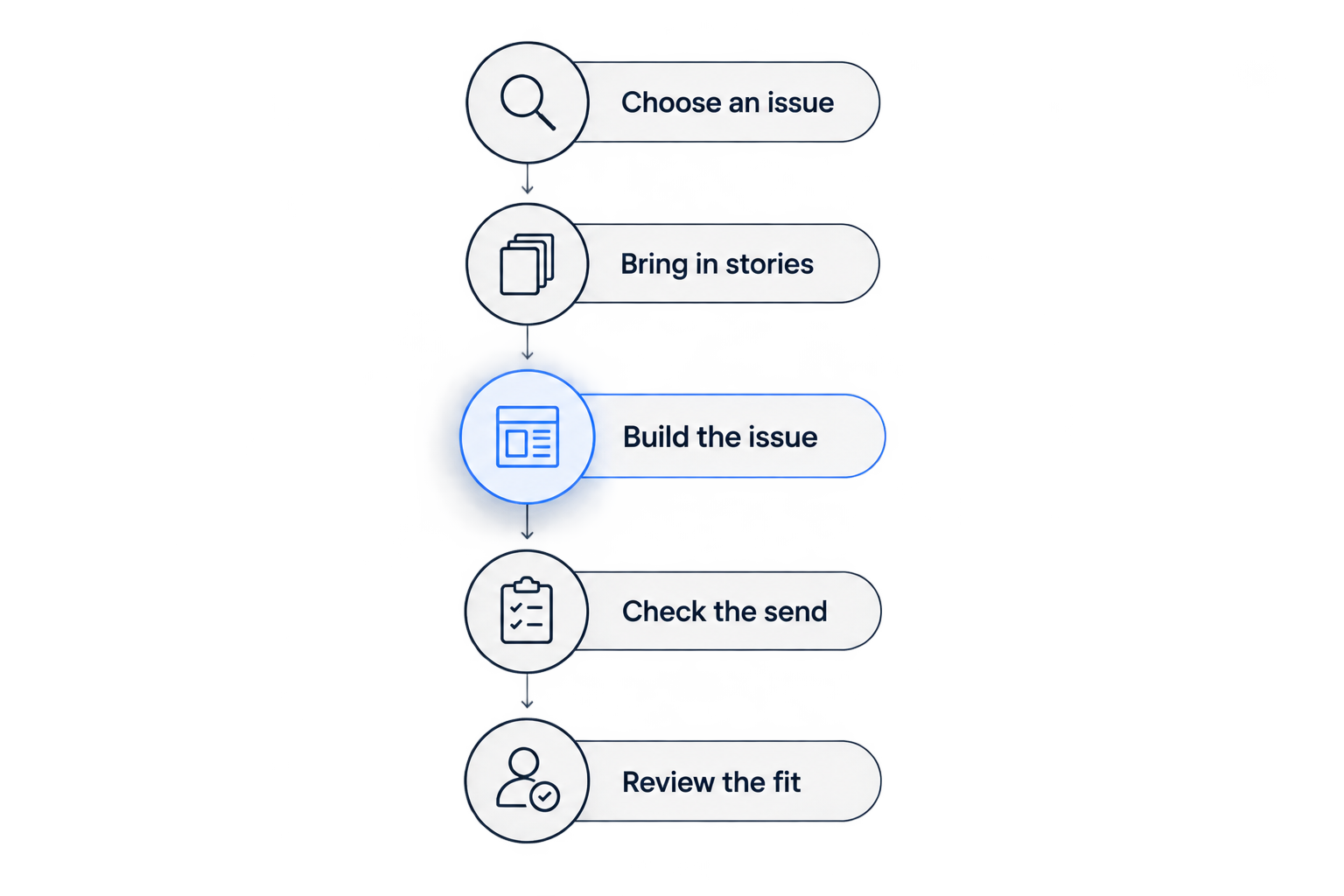
Test a real publishing workflow before judging the platform’s fit.
What should a platform evaluation checklist include?
Use this worksheet for your 2026 evaluation. Fill it in with your own publishing requirements and answers demonstrated in the product; the blank fields are deliberately not a vendor scorecard.
| Evaluation field | What your team should write down |
|---|---|
| Reader and purpose | Who the newsletter serves and why it exists |
| Newsletter goal | What better looks like for this newsletter |
| Story intake | Where stories originate and how they enter issue production |
| Editorial owner | Who decides what goes into the issue |
| Review owner | Who checks and approves the send |
| Promotions | What needs to be coordinated across newsletters |
| Contact definition | Which contacts count and how overlapping subscriptions are handled |
| Required capabilities | What must be verified before a decision |
| Transition owner | Who handles the move and the sending-reputation plan |
| Unresolved work | Tasks that remain manual or outside the platform |
Ask the person who builds issues to complete this with whoever owns the newsletter program. Their answers serve different purposes: one describes production; the other describes what the newsletter needs to achieve.
Don’t approve a switch while a required capability remains an assumption. Record the answer, the evidence shown and the person responsible for resolving it. A clear unanswered question is more useful than a confident guess.
How should you count contacts and emails?
Contacts and emails are different units. A contact represents a reader record; email volume represents messages sent. Both matter when you’re checking whether a plan fits your publishing schedule.
Letterhead bases pricing on active contacts: a contact is active when at least one subscription is marked subscribed. A reader subscribed to three newsletters counts once. Unsubscribed, cleaned, disengaged and contacts without subscriptions do not count.
The free plan includes up to 5,000 contacts and 5,000 emails a month, with no credit card needed to sign up. Those are separate limits, not interchangeable allowances. A reader receiving several newsletters still generates several email sends even when that reader counts as a single active contact.
For your 2026 evaluation, check the overlap between newsletters and the messages your publishing schedule requires. Don’t judge plan fit from the contact total alone, and don’t describe the free plan as unlimited.
Does switching platforms improve inbox placement?
Switching platforms isn’t a promise of better inbox placement. Moving means rebuilding sending reputation, so your transition needs a plan for IP warming rather than an assumption that sending can continue unchanged.
Keep that decision separate from the production evaluation. A platform can suit your editorial workflow without removing the work involved in changing senders. Assign responsibility for the transition and establish the plan before the move.
The same distinction applies to support. Confirm what your plan includes instead of assuming every customer receives full-service onboarding or dedicated support.
Can you evaluate a platform without moving every newsletter?
You can evaluate the publishing workflow before committing to a full move. Use an existing issue to examine story intake, issue preparation, checks and promotional work without treating the demonstration as a migration.
Then document what a move would require. Confirm the capabilities your team depends on, the support included in the proposed plan and who owns each transition task. A successful demonstration supports a decision; it doesn’t complete the switch.
FAQ
Is a dedicated newsletter platform worth it for a small media team?
A dedicated newsletter platform is worth evaluating when a small media team has recurring publishing work its current setup doesn’t handle well. Teams running two to five newsletters should test story intake, issue preparation and checks against a real issue.
Should I switch if my current email tool still works?
Keep your current tool if it supports your publishing needs without recurring workarounds. Switch only when you can name the problem and demonstrate how the proposed platform addresses it.
Do I need a website to evaluate a newsletter platform?
An existing website makes website-to-newsletter story intake directly relevant. If your team doesn’t publish on a website, assess the platform against the way you actually source and prepare stories.
Does a reader on several newsletters count as several active contacts?
Letterhead counts a reader subscribed to several newsletters once. A contact is active when at least one subscription is marked subscribed.
Does a newsletter platform remove editorial review?
No, your team still needs to decide which stories belong in an issue and approve the send. Story intake and newsletter assistance don’t replace editorial responsibility.
What’s the most useful question to ask during a demonstration?
Ask the vendor to show how your team would prepare an issue you’ve already published. Record which tasks change, which remain manual and which requirements still need verification.
What’s the final check before you decide?
Write down what will still happen outside the platform. That list is the useful counterweight to a feature demonstration: it shows the work your team will continue to own.
For a 2026 decision, the standard is simple. Choose the setup that supports your actual newsletters, readers and production responsibilities—not the one with the longest feature list.
Related guides
By Letterhead