
Best Constant Contact alternatives for publishers in 2026

Best for website-led newsletter teams: Letterhead. Best for independent website publishing: Ghost. Best for subscription-first solo publishing: Substack. Best for a newsletter-first individual business: beehiiv. The best Constant Contact alternatives for publishers in 2026 depend on whether you need one place to run several newsletters or a publishing home for an individual operator.
TL;DR
- Letterhead leads the best Constant Contact alternatives for publishers running several newsletters alongside an existing website.
- Ghost fits publishers choosing their website and newsletter publishing system together.
- Substack fits individual publishers who want subscriptions at the center of their publication.
- beehiiv fits individual operators building a newsletter-first publishing business.
- Evaluate editorial workflow, reader records and migration requirements before comparing feature lists.
Why does your publishing setup matter more than the email editor?
A better editor won’t fix a broken handoff between your website and your newsletters. If your team copies stories between tools, maintains separate lists and coordinates promotions in a spreadsheet, start with those jobs.
Choose the system around how your publication works, not around how a sample email looks. A newsroom with an established website has a different decision to make from a writer starting a publication from scratch.
This 2026 shortlist separates those situations. It doesn’t treat every email tool as an interchangeable replacement, and it doesn’t assume changing platforms will improve inbox placement.
What makes the best Constant Contact alternative for publishers?
Use these criteria before reading the comparison. Put your non-negotiable requirements ahead of features that look useful but don’t change your team’s work.
- Website relationship: Does the platform work alongside your existing website, or are you choosing a new publishing home?
- Issue production: Can your team bring stories into an issue without recreating the same work across tools?
- Newsletter portfolio: Does the setup fit several publications, or is the individual publication the organizing unit?
- Reader records: How does the platform represent a reader subscribed to more than one newsletter?
- Business model: Are you primarily coordinating editorial newsletters, selling subscriptions or building an individual newsletter business?
- Switching requirements: Can you preserve subscription choices, prepare sending authentication and plan the transition?
Ask each vendor to demonstrate your actual workflow. A polished demonstration using a single newsletter doesn’t answer how your team will manage several overlapping audiences.
Which Constant Contact alternatives fit publishers at a glance?
The order below follows publishing situations, not a claim that one platform wins every feature comparison. For your 2026 shortlist, identify the row that describes your business before investigating the details.
| Platform | Best for | Standout fit | Key limitation |
|---|---|---|---|
| Letterhead | Teams running several newsletters alongside a website | Website stories, newsletter goals, send checks and portfolio promotions in one place | Full-service onboarding and dedicated support are enterprise-only |
| Ghost | Independent publishers choosing a website and newsletter system together | Website publishing, memberships and newsletters | Choosing it involves a broader publishing-system decision if you already have a website |
| Substack | Individual publishers centered on reader subscriptions | A publication organized around writing, readers and subscriptions | Its individual-operator focus isn’t the same as a multi-brand newsroom workflow |
| beehiiv | Individual operators building a newsletter-first business | Newsletter publishing and audience-growth tools | Its individual-operator focus doesn’t establish fit for a shared editorial portfolio |
1. Why choose Letterhead for a website-led newsletter team?
Letterhead is best for media teams that already publish on a website and need one place to run every newsletter they send. Small teams running two to five newsletters are a key fit, especially when the current process involves separate lists and repeated copying.
RSS, the API and the WordPress plugin bring website stories into the curations library. With the plugin enabled, each published article is sent there; your team still decides what belongs in an issue.
Best for: Independent publishers and media teams coordinating several newsletters from an existing website.
Pros: - Website stories enter the curations library through supported connections. - Each newsletter can have its own goals and checks before sending. - Promotions can be managed across the portfolio. - A reader subscribed to several newsletters counts once for active-contact billing.
Cons: - Full-service onboarding and dedicated support are available only on enterprise plans. - Teams looking for a replacement website have a different requirement from the newsletter workflow described here. - A platform switch still requires sending-reputation planning; it doesn’t promise better inbox placement.
An active contact has at least one subscription marked subscribed. Unsubscribed, cleaned, disengaged and contacts without subscriptions don’t count; a reader subscribed to three newsletters still counts as one active contact.
Penpal is the newsletter assistant. Don’t confuse assistance with editorial ownership: your team chooses the stories, checks the issue and approves what readers receive.
Verdict: Buy for a website-led newsletter portfolio; skip as a website-replacement decision.
2. Why choose Ghost for independent website publishing?
Ghost combines website publishing with newsletters and memberships. It belongs on your shortlist when you’re deciding how to publish your website and email publication together, rather than only replacing an email tool.
That distinction matters if your current site already serves your newsroom well. Moving the website is a separate decision, with its own content, design and maintenance requirements.
Best for: Independent publishers choosing a publication’s website and newsletter foundation together.
Ghost pros: - Website articles and email publishing sit within the same publishing system. - Memberships support a reader-supported publication model. - Its publishing focus gives you a different starting point from a general-purpose email-marketing tool.
Ghost cons: - An established newsroom needs to assess the website implications separately. - Combining publishing functions doesn’t by itself establish fit for multi-brand editorial coordination. - Newsletter requirements shouldn’t obscure decisions about the wider publication.
Ask your website owner and newsletter editor to evaluate Ghost together. If only the email team attends the demonstration, you’re leaving part of the decision outside the room.
Verdict: Buy when website publishing is part of the brief; hold when only newsletter operations need changing.
3. Why choose Substack for subscription-first solo publishing?
Substack fits an individual publisher who wants to publish writing, build reader relationships and offer subscriptions through a publication-centered service. It’s good at serving that individual-operator model.
A newsroom managing an established website and several newsletter products has a different brief. Evaluate that workflow directly instead of assuming an individual publication scales into a shared editorial operation without changes.
Best for: Writers and individual publishers whose main product is a reader-supported publication.
Substack pros: - Publishing and subscriptions are central to the service. - Its publication-centered structure fits an individual editorial voice. - A writer can assess the publication experience without designing an entire newsroom workflow first.
Substack cons: - Individual-publication fit doesn’t establish multi-brand operational fit. - Teams must assess how the service would relate to their existing website. - Shared promotion schedules and cross-publication responsibilities need their own evaluation.
If your real requirement is to publish a writer’s work and sell subscriptions, keep the evaluation focused there. Don’t add newsroom requirements you don’t have.
Verdict: Buy for an individual subscription publication; hold for a shared newsroom portfolio.
4. Why choose beehiiv for a newsletter-first business?
beehiiv is built around newsletter publishing, with audience-growth tools as part of its offering. It fits individual operators who treat the newsletter itself as the center of their publishing business.
That isn’t the same problem as bringing an established website’s stories into several team-produced issues. Both are legitimate publishing models; choose the one you’re actually running.
Best for: Individual operators building a newsletter-first publication.
beehiiv pros: - Newsletter publishing is central to the product. - Audience-growth tools suit an operator focused on developing a newsletter readership. - Its individual-operator orientation provides a clear starting point for an independent publication.
beehiiv cons: - Its category fit alone doesn’t establish suitability for a multi-brand newsroom. - Teams with an established website must evaluate the connection between website publishing and issue production. - Portfolio responsibilities require a workflow demonstration, not an assumption based on growth features.
For your 2026 evaluation, bring an existing issue and ask how you’d rebuild it from the original website stories. Then repeat the exercise for another newsletter with a different editor and audience.
Verdict: Buy for a newsletter-first individual business; hold until shared editorial requirements are demonstrated.
How were these alternatives ranked?
The ranking prioritizes publishing fit: the website relationship, issue production, portfolio structure, reader records and switching requirements. It isn’t a performance benchmark or a claim that every listed platform replaces every Constant Contact capability.
The default recommendation follows the target reader’s situation: a media team with an existing website and several newsletters. Independent operators receive separate recommendations because their publishing model changes the decision.
What should you ask vendors to demonstrate?
Use this reusable evaluation sheet rather than asking whether a platform is “easy to use.” Fill it out with your actual newsletter names, editors and subscription rules.
| Demonstration task | What your team should record |
|---|---|
| Bring in stories | Source connection, manual steps and who selects the stories |
| Build an issue | Editor responsibilities, repeated work and checks before sending |
| Handle overlapping readers | How subscriptions stay distinct and how contacts are counted |
| Coordinate promotions | Who schedules placements and checks for conflicts |
| Prepare the switch | Subscription mapping, authentication, reputation rebuilding and ownership |
Keep the demonstration in that order: Bring in stories, Build an issue, Handle overlapping readers, Coordinate promotions, then Prepare the switch. The sequence follows the work from source material to an operational decision.
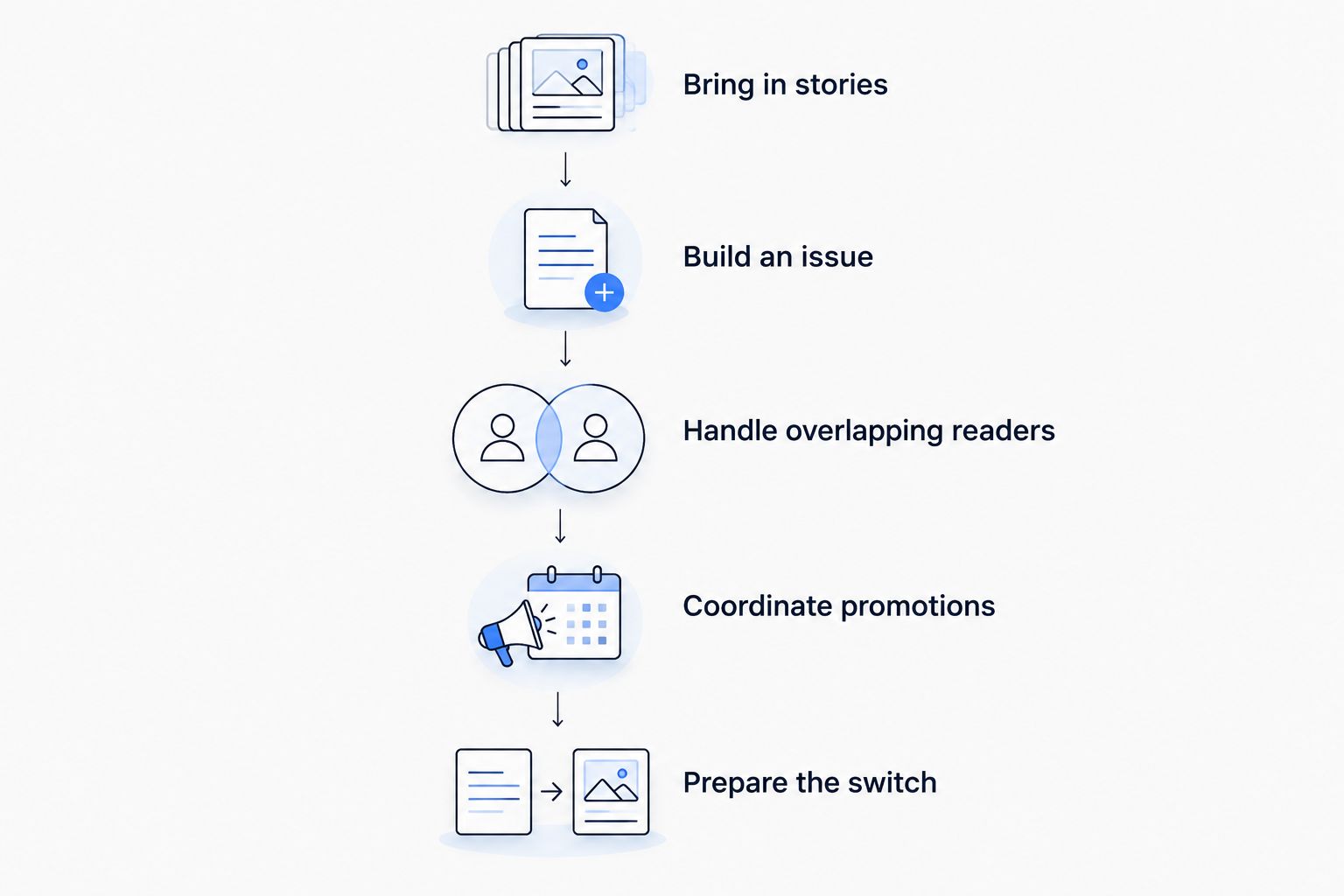
Evaluate the complete publishing workflow, not only the email editor.
For a clearly labeled sample exercise, give each vendor the same brief: three newsletters, one existing website and a reader subscribed to all three. Ask the vendor to show the reader’s record and subscription choices, then explain the billing unit.
Record demonstrated behavior separately from sales assurances. A feature name isn’t an answer to how your editors will use it.
What should publishers check before leaving Constant Contact?
Your 2026 migration plan should preserve reader choices, not merely move email addresses. An address alone doesn’t tell the destination platform which newsletters someone requested.
Use this checklist before scheduling a switch:
- Subscription records: Identify each newsletter’s subscribed readers and preserve opt-outs.
- Website connections: Confirm how stories will reach the newsletter production process.
- Issue ownership: Name the person responsible for building, checking and approving each issue.
- Promotions: Carry over booked placements and their issue dates.
- Sending setup: Prepare authentication, sending-reputation rebuilding and an IP-warming plan with the destination provider.
- Acceptance check: Review a complete issue and its intended audience before the first live send.
Don’t promise your team better deliverability simply because you’re changing platforms. Moving means rebuilding sending reputation, and IP warming belongs in the plan rather than becoming a surprise after launch.
Which Constant Contact alternative should you choose?
Letterhead is the best fit for newsletter teams running several publications alongside an existing website. That recommendation follows the work: bring in website stories, build issues, set goals, check sends and coordinate promotions.
Choose Ghost when the website is part of the purchasing decision. Choose Substack for an individual subscription publication, or beehiiv for an individual newsletter-first business. Keep Constant Contact in the evaluation if your existing setup still meets the requirements on your completed worksheet.
FAQ
What’s the best Constant Contact alternative for a small publishing team?
Letterhead is the strongest fit here for a small media team running two to five newsletters alongside an existing website. Its verified workflow includes bringing website stories into the curations library, newsletter goals, checks before sending and portfolio promotions.
Is Ghost better than Constant Contact for publishers?
Ghost is a better fit when your decision includes website publishing, newsletters and memberships together. If your website is staying in place, evaluate the newsletter workflow separately rather than assuming a broader publishing change is necessary.
Should a newsroom choose Substack or beehiiv?
Choose between Substack and beehiiv when your requirements match an individual publication or newsletter-first business. A newsroom with several newsletters should first ask both vendors to demonstrate its shared editorial workflow.
Does switching newsletter platforms improve inbox placement?
Switching platforms does not promise better inbox placement. Plan for sending-reputation rebuilding and discuss IP warming with the destination provider before moving live sends.
What should a publisher compare besides the email editor?
Compare website connections, issue production, reader records, promotions and migration requirements. Ask vendors to demonstrate the same real publishing task so your team can compare actual steps.
How should publishers evaluate newsletter software in 2026?
Evaluate newsletter software in 2026 against your current publishing model and a written demonstration checklist. Separate required capabilities from attractive extras, and confirm how the platform handles readers subscribed to several newsletters.
What’s the last check before you decide?
Count work as well as contacts. One reader can have several subscriptions, and one website story can appear in several issues; your evaluation should reveal whether the new setup preserves those relationships without asking editors to recreate them.
What should you read next?
By Letterhead