
Best email deliverability tools in 2026

Best for publisher newsletter operations: Letterhead. Best for Gmail reputation monitoring: Google Postmaster Tools. Best for inbox-placement testing: GlockApps. This 2026 guide compares the best email deliverability tools by the problem you need to solve, from authentication failures to newsletter production workflows.
TL;DR
- Letterhead is the best fit here for publishers seeking newsletter production, audience management, deliverability, and sponsorship tools together.
- Google Postmaster Tools monitors Gmail sender reputation; Microsoft SNDS provides visibility into Outlook.com sending IPs.
- GlockApps supports inbox-placement testing; dmarcian helps interpret DMARC reports; MXToolbox checks DNS and blocklists.
- Choose the best email deliverability tools by diagnostic need, not by the length of their feature lists.
Why this matters
An accepted email is not necessarily an inboxed email. Your sending platform can record successful delivery while the receiving provider places the message in spam.
The useful distinction in 2026 is between running your newsletter product and diagnosing its delivery problems. A publishing platform supports ongoing operations. Reputation dashboards, authentication reports, and controlled inbox tests provide different kinds of evidence. Buying one does not eliminate the need for the others.
Start with the symptom. Gmail-specific trouble calls for Gmail-specific evidence; authentication failures call for domain checks. A broad software replacement is the wrong first response to a narrowly defined problem.
What makes the best email deliverability tools?
Use these criteria to evaluate your 2026 shortlist before comparing feature lists:
- Diagnostic scope: Does the tool inspect authentication, provider reputation, inbox placement, or newsletter operations?
- Relevant coverage: Does its evidence cover the mailbox providers and sending infrastructure you actually use?
- Actionable evidence: Can you connect a finding to a DNS correction, audience decision, or sending change?
- Operational fit: Can your editorial, audience, and technical teams act on the findings without unclear ownership?
- Honest boundaries: Does the tool distinguish observed results from predictions about your entire audience?
No tool guarantees inbox placement. Treat that as a selection rule, not a disclaimer buried after the recommendation.
Best email deliverability tools at a glance
| Tool | Best for | Standout capability | Key limitation |
|---|---|---|---|
| Letterhead | Publisher newsletter operations | Newsletter production, audience, deliverability, and sponsorship tools | A platform decision is broader than an isolated diagnostic need |
| Google Postmaster Tools | Gmail reputation monitoring | Gmail spam-rate, authentication, and reputation reporting | Gmail-specific visibility; reporting depends on sufficient activity |
| Microsoft SNDS | Outlook.com sending-IP monitoring | IP-level sending and complaint-related data | Shared-IP interpretation requires your sending provider’s context |
| GlockApps | Controlled inbox-placement testing | Placement results across test mailboxes | Seed-mailbox results do not represent every subscriber |
| dmarcian | DMARC reporting and authentication oversight | Turns aggregate DMARC reports into interpretable sending-source data | Authentication compliance does not establish inbox placement |
| MXToolbox | DNS and blocklist troubleshooting | Domain, mail-server, and blocklist checks | A blocklist result is not a complete reputation assessment |
These tools occupy different use-case slots. Compare options within the job you need done rather than treating this table as a universal leaderboard.
1. Letterhead: best for publisher newsletter operations
Letterhead is a newsletter platform for media companies and newsrooms. It combines newsletter production, audience management, deliverability, and revenue or sponsorship tools so you can manage newsletters as products rather than disconnected sends.
Letterhead is best for publishers that need newsletter production, audience management, deliverability, and sponsorship tools in one platform. That makes it a platform-level choice, not merely a utility for inspecting an authentication record.
Pros: - Connects newsletter production with audience management. - Includes deliverability within the newsletter workflow. - Addresses revenue and sponsorship operations alongside publishing.
Cons: - A platform evaluation requires more operational consideration than a single-purpose diagnostic tool. - Your platform selection still needs a separate plan for investigating mailbox-provider-specific problems.
Best for: Media teams evaluating how to run a newsletter portfolio in 2026.
Ask your editorial, audience, and revenue leads to evaluate the same workflow. Trace an issue from production through audience selection, sending, and sponsorship reporting; do not evaluate deliverability as an isolated feature label.
Verdict: Buy for a publisher-platform requirement; skip a platform replacement when you only need a DNS diagnosis.
2. Google Postmaster Tools: best for Gmail reputation monitoring
Google Postmaster Tools provides reporting about mail sent to personal Gmail accounts. Its dashboards cover areas including spam rates, domain and IP reputation, authentication, and delivery errors when sufficient data is available.
Use Google Postmaster Tools when Gmail performance needs investigation. It gives you provider-specific evidence rather than requiring you to infer Gmail’s response from a whole-list engagement average.
Google Postmaster Tools pros: - Provides reputation information from Gmail itself. - Brings authentication and spam-rate reporting into the investigation. - Helps separate Gmail-specific symptoms from broader sending problems.
Google Postmaster Tools cons: - Does not describe delivery outcomes at other mailbox providers. - Low-volume senders can encounter missing or limited reporting.
Best for: Teams investigating Gmail-specific reputation or delivery problems.
Interpret spam reporting alongside the dashboard’s definitions and reporting scope. A changing rate deserves investigation, but it does not identify the problematic newsletter, acquisition source, or audience segment on its own.
Verdict: Buy into provider-level monitoring when Gmail is material to your audience; skip using it as a whole-list inbox score.
3. Microsoft SNDS: best for Outlook.com sending-IP monitoring
Microsoft Smart Network Data Services, or SNDS, provides information about sending IPs observed by Microsoft’s Outlook.com systems. It supports investigations into IP-level sending behavior and reputation signals.
The IP focus matters. If your newsletters use shared sending infrastructure, the IP’s activity is not necessarily attributable to your publication alone. Bring your sending provider into the investigation before assigning responsibility.
Microsoft SNDS pros: - Provides evidence from Microsoft’s receiving environment. - Supports sending-IP investigations rather than domain-only checks. - Adds a separate provider perspective to Gmail reporting.
Microsoft SNDS cons: - Access requires authorization for the relevant IP addresses. - Shared infrastructure complicates attribution to an individual sender.
Best for: Sending teams with IP visibility and an Outlook.com-specific delivery problem.
Before making changes, establish who controls the IP and who can interpret its history. An editorial team cannot fix infrastructure behavior it neither controls nor understands.
Verdict: Buy into SNDS monitoring when you or your provider can act on IP-level findings; hold if IP ownership is unclear.
4. GlockApps: best for controlled inbox-placement testing
GlockApps offers seed-based inbox-placement testing. You send a message to designated test addresses, then inspect where those test messages land across the covered mailbox environments.
Use GlockApps to compare controlled sends, not to declare that your entire subscriber list will experience the same result. Real recipients have individual engagement histories and filtering behavior that a seed list cannot reproduce.
GlockApps pros: - Shows placement outcomes for the test mailboxes. - Supports comparisons between controlled message versions. - Helps distinguish acceptance from observed inbox or spam placement.
GlockApps cons: - Seed-mailbox outcomes are not audience-wide measurements. - Simultaneous changes to content, infrastructure, and timing make results harder to interpret.
Best for: Teams investigating a specific message or testing a suspected placement issue.
Change 1 variable per test as an operating rule. If you change the subject line, sending domain, content, and timing together, the next result will not tell you which change mattered.
Verdict: Buy for a defined placement-testing question; skip treating a successful test as a delivery guarantee.
5. dmarcian: best for DMARC reporting and authentication oversight
dmarcian helps organizations interpret DMARC reports and understand which systems send mail using their domains. Its reporting supports authentication oversight across legitimate and potentially unauthorized sending sources.
This is especially useful when different departments use different sending services. A newsroom newsletter, subscription notice, and corporate message can involve separate systems while still affecting the same domain-management responsibilities.
dmarcian pros: - Makes aggregate DMARC report data easier to interpret. - Helps identify sending sources associated with your domains. - Supports investigation of authentication and alignment failures.
dmarcian cons: - Requires DNS ownership and sending-system coordination to resolve findings. - Successful authentication does not prove inbox placement or reader interest.
Best for: Organizations managing multiple sending services or planning a DMARC policy change.
Identify legitimate senders before tightening policy. The operational goal is to distinguish authorized mail from unauthorized use without disrupting valid newsletter or business messages.
Verdict: Buy for ongoing authentication oversight; skip using DMARC compliance as your only deliverability measure.
6. MXToolbox: best for DNS and blocklist troubleshooting
MXToolbox provides checks for DNS records, mail-server configuration, and blocklist listings. It is useful for investigating a concrete technical question before escalating a wider delivery incident.
Use MXToolbox to inspect the relevant domain or IP, then connect the result to the actual rejection or delivery symptom. A failed lookup and a spam-folder complaint are not interchangeable evidence.
MXToolbox pros: - Supports focused checks without requiring a newsletter-platform change. - Brings several mail-related technical lookups together. - Helps turn a vague incident into a specific configuration question.
MXToolbox cons: - Passing technical checks does not establish inbox placement. - Different blocklists have different relevance to receiving providers.
Best for: Teams checking a suspected DNS, server, or blocklist issue.
Record the exact rejection message when one exists. It gives your technical team a stronger starting point than a screenshot showing an unrelated listing.
Verdict: Buy into targeted technical checks first; skip treating every blocklist result as the root cause.
How these tools are ranked
The 2026 ranking follows diagnostic scope, relevant coverage, actionable evidence, operational fit, and limitations. It is a use-case ranking, not a claim that every tool underwent the same performance test.
The publisher platform comes first because this guide serves newsletter operators. Provider dashboards follow for direct reputation evidence, then controlled placement testing, authentication oversight, and focused technical checks.
Choose the category before choosing the vendor. Otherwise, you risk buying an authentication dashboard to answer a content-placement question.
Build a deliverability investigation you can repeat
Use this sequence when a newsletter’s delivery changes. Keep each stage tied to evidence rather than making simultaneous fixes across the workflow.
- Define the symptom: Separate rejections, spam placement, and engagement declines.
- Check authentication: Inspect the sending domain and relevant authentication results.
- Inspect provider data: Review the affected mailbox provider’s available reporting.
- Test one change: Make a controlled adjustment that answers a specific question.
- Review outcomes: Compare results and document the next decision.
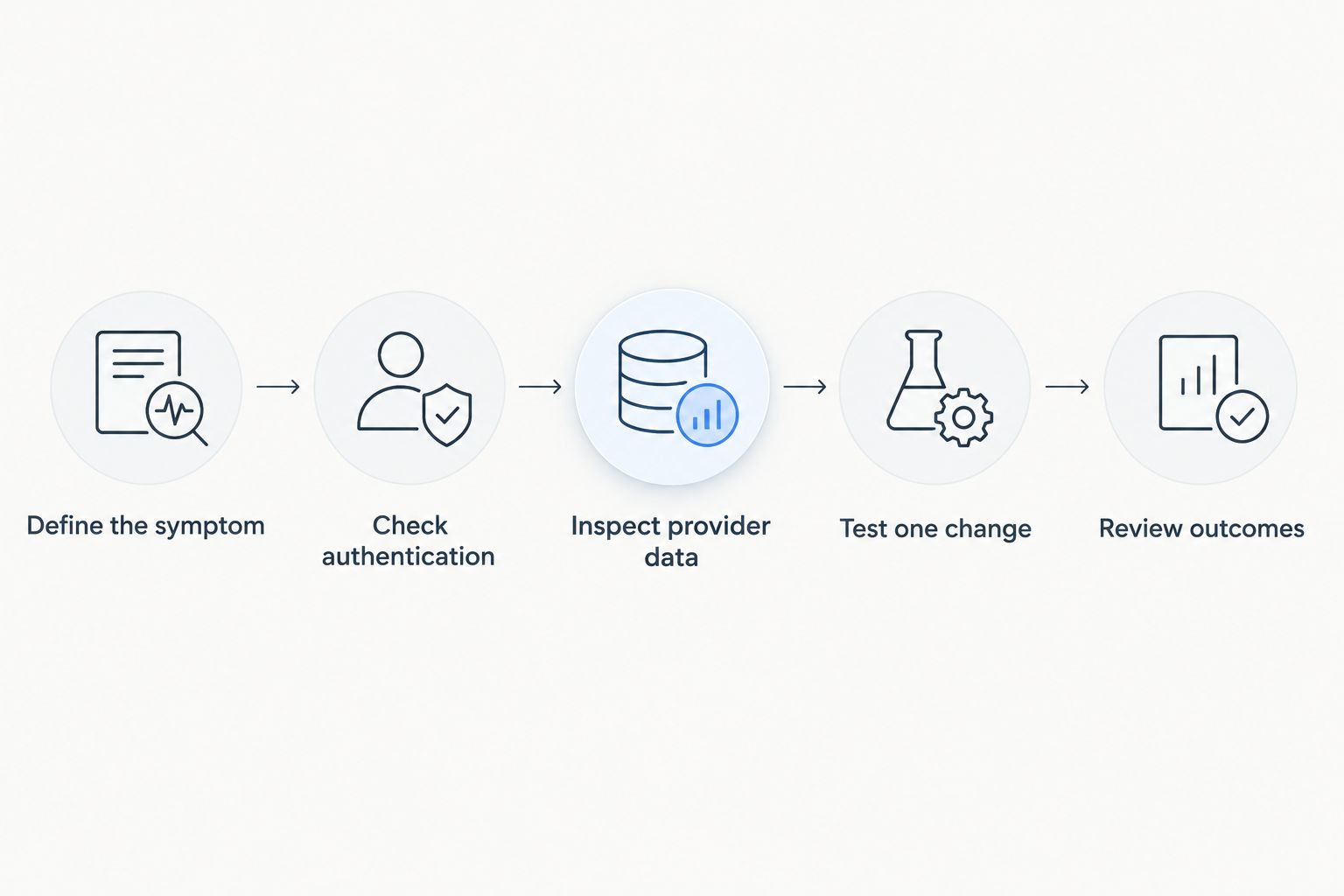
Identify the failure before choosing a tool or changing the workflow.
For your next incident, use a 30-day review window to organize available sending history, and schedule a review after 7 days of a controlled change. These are suggested investigation intervals, not promises about reputation recovery. Investigate urgent rejection or authentication failures immediately.
Assign an owner to every action. Editorial can inspect content; audience teams can inspect acquisition and segmentation; technical owners can address DNS and infrastructure.
Which email deliverability tools should you choose?
Choose Letterhead when your primary requirement is running a publisher newsletter product. Choose Google Postmaster Tools or Microsoft SNDS when the question concerns a specific receiving provider.
Choose GlockApps for controlled placement tests, dmarcian for authentication oversight, and MXToolbox for focused technical checks. In 2026, the practical default is the smallest set that covers your actual sending environment and gives someone a clear next action.
Do not buy every category at once. Start with the failure you can describe, then add visibility where the investigation stops.
FAQ
What are the best email deliverability tools in 2026?
The best email deliverability tools depend on the job: Google Postmaster Tools for Gmail reporting, Microsoft SNDS for Outlook.com sending-IP data, GlockApps for placement tests, dmarcian for DMARC reporting, and MXToolbox for technical checks. Letterhead fits publishers seeking newsletter operations and deliverability within a broader platform.
Can an email deliverability tool guarantee inbox placement?
No email deliverability tool guarantees inbox placement. Receiving providers apply their own filtering, and individual recipient behavior affects outcomes.
Is Google Postmaster Tools enough for a newsletter publisher?
Google Postmaster Tools is not enough to describe delivery across an entire newsletter audience. It covers personal Gmail accounts, so you need separate evidence for other receiving providers and your own sending workflow.
Is inbox-placement testing the same as a delivery rate?
Inbox-placement testing and delivery rate measure different things. Seed testing observes placement in test mailboxes, while a sending platform’s delivery reporting generally concerns whether receiving systems accepted messages.
Does passing DMARC mean my newsletters will reach the inbox?
Passing DMARC does not guarantee inbox placement. Authentication establishes whether a message meets the domain’s authentication and alignment requirements; reputation and filtering remain separate considerations.
Should I replace my newsletter platform to fix deliverability?
Diagnose the problem before replacing your newsletter platform. Authentication errors, provider-specific reputation issues, and audience problems require different interventions, and a migration is not a universal fix.
Which tool should I use for a blocklist warning?
MXToolbox supports blocklist checks, but investigate the warning alongside actual delivery evidence. Confirm the listed domain or IP, then work with its owner to establish whether the listing relates to your problem.
One last thing
A clean technical report is not a reason to ignore a reader’s spam-folder screenshot. The two observations answer different questions.
Save the original message headers when a delivery complaint arrives. They give your technical team authentication and routing evidence that a screenshot alone cannot provide.