
Best content curation tools for newsletters in 2026

Best overall for website-based publishing teams: Letterhead. Best for following outside publications: Feedly; best for filtering feeds: Inoreader; best for topic monitoring: Google Alerts; best for saving handpicked links: Raindrop.io. These newsletter curation tools solve different parts of the job, so choose around where your stories come from and how your team turns them into an issue.
TL;DR
- Letterhead is the best fit for newsletter teams bringing website stories into a shared publishing workflow.
- Feedly and Inoreader suit RSS-based discovery; Google Alerts suits topic monitoring.
- Raindrop.io suits handpicked link collections, not end-to-end newsletter production.
- Choose newsletter curation tools by source collection, editorial judgment, and the handoff into each issue.
Why does your newsletter need a curation tool?
A curation tool should help you decide what belongs in the next issue, not just collect more links. A folder full of unread stories isn’t an editorial workflow.
For a small team running two to five newsletters, the useful distinction is between discovering stories and producing issues. You might need an RSS reader to follow outside sources, a shared collection for selected links, or a publishing platform that brings your own website stories into the newsletter workflow.
For this 2026 shortlist, the deciding question is where your editorial work gets stuck. Don’t replace your sending platform just because you need a better reading list. Don’t buy another reading list when copying website stories into issues is the actual problem.
What makes the best newsletter curation tools?
Use these criteria before comparing feature lists:
- Source fit: Does the tool collect your website stories, outside feeds, topic mentions, or manually selected links?
- Editorial selection: Can you separate something worth reading from something approved for an issue?
- Organization: Can your team distinguish newsletters, topics, and future candidates without losing context?
- Production handoff: What happens between selecting a story and building the issue?
- Workflow scope: Does the tool fix discovery, collection, or the broader publishing job?
No tool makes an editorial decision for you. Your team still needs to check the source, decide why a story matters, and explain its relevance to readers.
How do the tools compare at a glance?
This 2026 comparison ranks tools by their fit for newsletter work, not by the size of their feature lists. Each recommendation owns a different job.
| Tool | Best for | Standout capability | Key limitation |
|---|---|---|---|
| Letterhead | Publishers bringing website stories into newsletter production | RSS, API, and WordPress imports into the curations library | Requires a broader workflow decision than choosing a reading app |
| Feedly | Following outside publications | RSS-based reading and source organization | Discovery still needs an editorial handoff into an issue |
| Inoreader | Filtering a busy feed collection | Feed organization and rule-based filtering | Rules need editorial oversight and maintenance |
| Google Alerts | Monitoring names and topics | Email alerts for matching Google Search results | Not a complete reading queue or publishing workflow |
| Raindrop.io | Saving handpicked links | Bookmark collections and tags | Collection alone doesn’t build or send an issue |
Which tool fits each newsletter curation job?
1. Letterhead: best for website-based newsletter teams
Letterhead gives your team one place to run every newsletter it sends. RSS, the API, and the WordPress plugin bring website stories into the curations library; with the plugin on, every published article is sent there.
The distinction is what surrounds that collection. Your team can build issues, set goals for each newsletter, check sends, and manage promotions across the portfolio. Penpal is the newsletter assistant, not a replacement for your editorial judgment.
Best for: Media and publishing teams, especially small teams running two to five newsletters from an existing website.
Pros:
- Brings website stories into the same environment as newsletter production.
- Supports newsletter goals and checks before each send.
- Includes portfolio promotions rather than treating every newsletter as an isolated task.
Cons:
- A wider platform decision than a standalone link collector.
- Full-service onboarding and dedicated support are enterprise-only.
Active contacts determine pricing. A contact is active when at least one subscription is marked subscribed; a reader subscribed to three newsletters counts once. Unsubscribed, cleaned, disengaged, and contacts without subscriptions don’t count.
Verdict: Buy for website-to-newsletter production; skip if you only need a personal reading queue.
2. Feedly: best for following outside publications
Feedly is an RSS reader that brings updates from publications into a reading environment. RSS is a feed format that lets a reader collect newly published content without visiting each source separately.
Use Feedly when your newsletter depends on regularly checking a defined set of outside publications. It addresses the discovery stage; you still need a clear decision about which stories deserve space in an issue.
Best for: Editors who follow recurring sources and need a more orderly reading routine.
Feedly pros:
- Collects supported feeds into one reading workflow.
- Lets you organize sources around topics.
- Separates source monitoring from your email inbox.
Feedly cons:
- A collected story isn’t automatically an approved newsletter item.
- The handoff into your publishing platform remains a separate consideration.
Before adopting Feedly, follow the publications you actually use and build a sample issue from the results. Check whether the reading process improves selection or merely expands the backlog.
Verdict: Buy for recurring source discovery; hold if your own website already supplies the issue.
3. Inoreader: best for filtering a busy feed collection
Inoreader combines RSS reading with tools for organizing and filtering incoming content. Its rules are relevant when a broad source list produces more material than an editor can usefully review.
Choose this route when you can describe what should enter the reading queue. Rules help apply those conditions, but they don’t establish whether a story is accurate, distinctive, or right for your readers.
Best for: Editors managing a large or noisy set of feeds.
Inoreader pros:
- Collects feed-based sources in one reader.
- Supports rules and filters for organizing incoming material.
- Gives source-heavy newsletters a defined discovery workspace.
Inoreader cons:
- Overly narrow filters can exclude useful stories.
- Rule setup and maintenance add work before the newsletter is built.
Check the current plan’s coverage for the rules you need. Then compare the filtered queue with an unfiltered sample so you can see what your conditions exclude.
Verdict: Buy when filtering is the bottleneck; skip complex rules when a short source list works.
4. Google Alerts: best for monitoring names and topics
Google Alerts emails you when it finds matching results in Google Search. It suits a defined watchlist: an organization, a person, a place, or a subject relevant to your coverage.
Treat those alerts as leads, not as a complete record of everything published. Search matching doesn’t tell you whether an item is original reporting or a useful newsletter recommendation.
Best for: Editors who need topic monitoring alongside an existing reading and publishing setup.
Google Alerts pros:
- Monitors search terms rather than requiring a chosen publication feed.
- Sends matching results to email.
- Helps surface material beyond your usual source list.
Google Alerts cons:
- Broad terms can produce irrelevant matches.
- Alerts don’t provide a complete editorial queue or issue-building process.
Start with a specific coverage question. An alert with no clear editorial purpose becomes another stream of messages to clear.
Verdict: Buy into the monitoring workflow; skip it as your sole curation system.
5. Raindrop.io: best for saving handpicked links
Raindrop.io is a bookmark manager with collections and tags. It fits newsletters whose editors find stories across different sites and want a deliberate place to save them.
This approach starts with human selection rather than a continuously arriving feed. That’s useful when each saved link already has a reason to be considered for an issue.
Best for: Editors assembling a selective link newsletter from manual browsing.
Raindrop.io pros:
- Saves links into organized collections.
- Uses tags to group material across topics.
- Keeps selected candidates separate from a browser’s open tabs.
Raindrop.io cons:
- Manual collection depends on consistent editor habits.
- Bookmarks still need context, approval, and a publishing handoff.
Agree on collection and tag names before adding a large archive. Otherwise, your bookmark manager becomes a tidier version of the same backlog.
Verdict: Buy for deliberate link collection; skip if automatic website imports are the requirement.
How should you evaluate a curation tool before switching?
The ranking uses source fit, editorial selection, organization, production handoff, and workflow scope. It is a fit-based shortlist, not a claim that every product was tested against the same publishing operation.
For your 2026 evaluation, take one real issue from source collection through final review. Keep the sources, editor, and newsletter brief consistent across candidates. Record each manual transfer instead of judging the tool by its demonstration.
Use this acceptance checklist:
- Source collection: Bring in the sources your actual issue requires.
- Story selection: Mark which candidates deserve consideration.
- Editorial context: Record why each selected story matters.
- Issue assembly: Move approved material into the newsletter.
- Final review: Check links, descriptions, and the issue’s purpose.
A tool passes when your team can explain who owns each step. A polished collection screen doesn’t compensate for an unclear handoff.
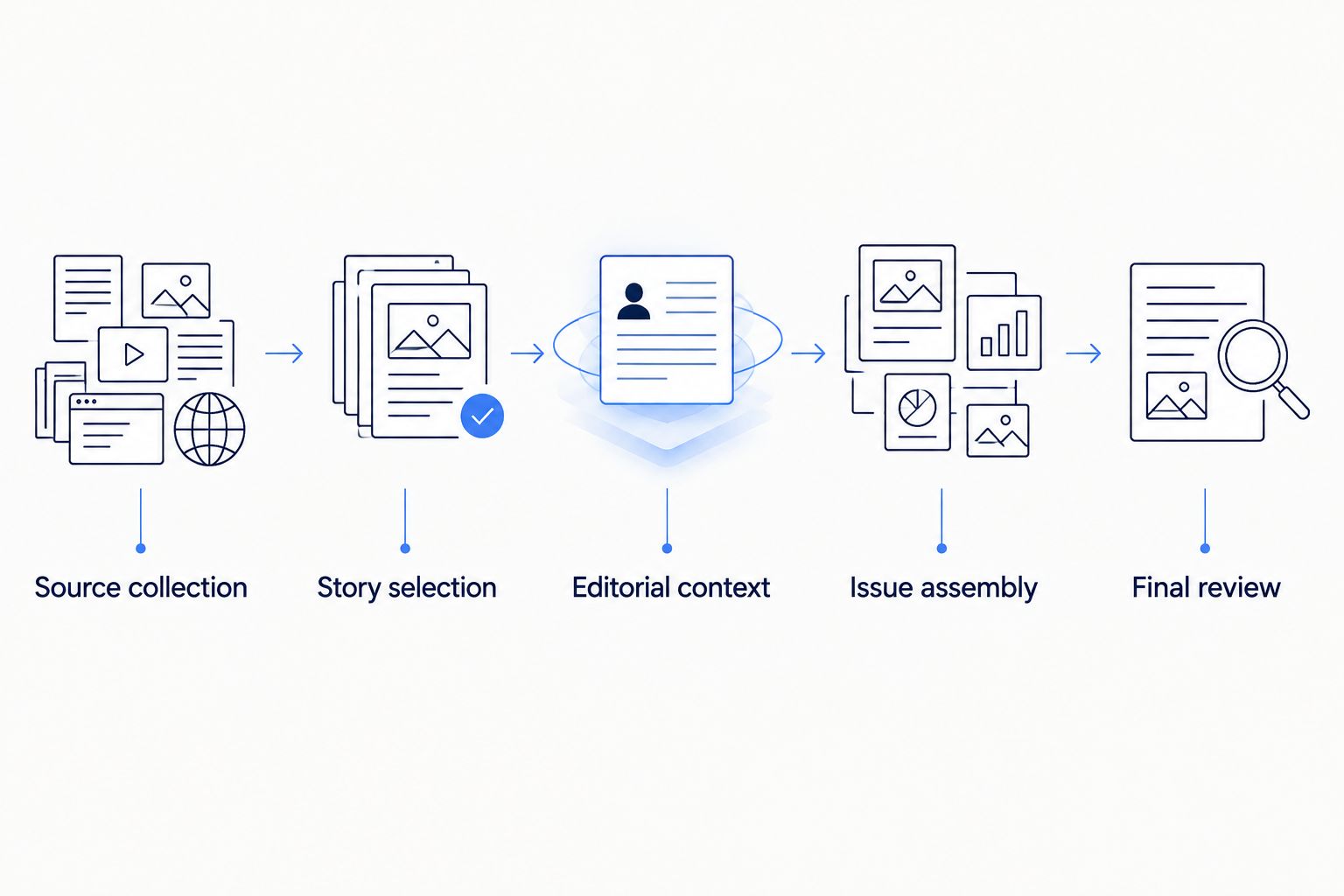
Evaluate the whole issue workflow, not just the collection screen.
What should your newsletter curation brief include?
Use this template before importing a backlog. It gives every saved story a job and helps another editor understand the selection without reopening the entire research process.
| Field | What to record | Acceptance question |
|---|---|---|
| Newsletter | The issue or newsletter being considered | Who is this for? |
| Source | Original URL and publisher | Can the editor verify the original? |
| Reader value | A sentence explaining the relevance | Why does this deserve attention? |
| Editorial status | Candidate, selected, or rejected | Is the next action clear? |
| Owner | The person responsible for the next decision | Who moves this forward? |
The brief is a working document, not a claim that every shortlisted tool includes these exact fields. Keep it wherever your team can use it consistently.
For example, a selected story needs more than a saved headline. Write the reason a reader should care, then have the issue editor check that reason against the newsletter’s goal. Rejecting a relevant-but-repetitive story is successful curation too.
Which newsletter curation tool should you choose in 2026?
Letterhead is the best fit for media teams that want website stories and newsletter production in one place. Choose Feedly for recurring outside sources, Inoreader for feed filtering, Google Alerts for topic monitoring, and Raindrop.io for handpicked links.
Don’t install all five because their jobs differ. Start with the bottleneck you can name, then add another tool only when a necessary step remains uncovered.
If your team is also changing its publishing platform, assess that separately from discovery. A platform move means rebuilding sending reputation; plan for IP warming rather than assuming that a better curation workflow changes inbox placement.
FAQ
What’s the best newsletter curation tool for a publishing team?
Choose a tool that connects your actual sources to issue production. Website-based teams need a different workflow from editors primarily collecting links from outside publications.
Is Feedly or Inoreader better for newsletter curation?
Feedly fits recurring source reading, while Inoreader fits a workflow centered on feed rules and filtering. Compare both using the same source list and a real issue brief.
Can Google Alerts replace an RSS reader?
Google Alerts monitors matching search results, while an RSS reader follows selected feeds. Use alerts for topics and names, and feeds for publications you want to follow regularly.
Do I need to change newsletter platforms to improve curation?
No, a discovery or bookmarking problem doesn’t automatically require a platform change. Consider a broader move when bringing selected stories into issues is the recurring problem.
Can a bookmark manager run my newsletter?
A bookmark manager collects links, but collection isn’t the same as building and sending an issue. You still need editorial review and a publishing workflow.
What should I check before adopting a curation tool in 2026?
Build one real issue with the tool and record the handoffs from source collection through final review. Check current plan coverage for any rules, imports, or collaboration requirements before committing.
What’s one last check before you decide?
Ask an editor who didn’t collect the stories to assemble the issue from your saved material. If that editor can’t explain why each item belongs, improve the curation brief before adding more sources.
Which related guides help with the wider decision?
By Letterhead