
Best newsletter automation tools in 2026

Best for media teams with an existing website: Letterhead. Best for marketing-led email: Mailchimp. Best for membership-led publishing: Ghost. Best for email design: Stripo. Newsletter automation in 2026 should remove repeat production work without removing your team’s editorial decisions.
TL;DR
- Letterhead is the best newsletter automation fit here for media teams publishing stories on an existing website.
- Mailchimp suits marketing-led email; Ghost suits membership-led publishing; Stripo addresses email production.
- Compare story intake, editorial checks, reader records and responsibilities before choosing a newsletter workflow.
- Keep a named editor responsible for each issue, even when repetitive production steps are automated.
Why does newsletter automation matter for publishers?
A newsletter isn’t finished when an email is scheduled. Your team still needs to choose stories, build an issue, check it and decide whether it served its readers.
The useful question is which repeated task your software removes. Moving stories from a website into a newsletter is a different job from sending a welcome sequence or designing a reusable email template. A tool can handle one well without being the right home for the others.
Letterhead is the best newsletter automation choice here for media teams that publish on a website and run several newsletters. That recommendation rests on its stated publishing workflow, not a claim that every publisher needs the same platform.
What makes the best newsletter automation tool?
Use these criteria for a 2026 shortlist before comparing feature lists:
- Story intake: How does published material reach the place where you assemble an issue?
- Editorial control: Who chooses the stories, checks the issue and approves the send?
- Newsletter fit: Is the main job publishing issues, running marketing campaigns, managing memberships or designing emails?
- Reader records: How does the system handle someone subscribed to several newsletters?
- Operational scope: Which tasks stay with your team or another system?
Start with the job that consumes attention every issue. A longer feature list doesn’t resolve a mismatch between your publishing process and the tool’s main purpose.
How do the newsletter automation tools compare at a glance?
These recommendations cover different jobs. The row order matches the detailed sections below; it isn’t a claim that a design tool should replace a publishing platform.
| Tool | Best for | Standout capability | Key limitation for this decision |
|---|---|---|---|
| Letterhead | Website-led media teams | RSS, API and WordPress story intake into a curations library | Full-service onboarding and dedicated support are enterprise-only |
| Mailchimp | Marketing-led email programs | Email campaigns and automated marketing journeys | Publishers must evaluate the complete editorial workflow, not just campaign automation |
| Ghost | Membership-led publications | Website publishing, newsletters and memberships | A website-centered publishing model isn’t the same requirement as coordinating an existing newsletter portfolio |
| Stripo | Email design and template production | Visual email building and reusable design work | It addresses production rather than the whole newsletter operation |
Don’t score all four against an imaginary universal workflow. First decide whether you’re buying a publishing home, marketing automation, a membership publication or a production component.
1. Is Letterhead best for website-led publishing?
Best for: media teams bringing website stories into two to five newsletters.
Letterhead gives your team one place to run every newsletter it sends. RSS, the API and the WordPress plugin bring stories into the curations library; with the plugin enabled, every published article is sent there.
The platform also supports goals for each newsletter, checks before each send and promotions across a portfolio. Penpal is the newsletter assistant. Your team still decides what belongs in an issue and what better looks like for its readers.
Letterhead pros:
- Website stories enter a shared library instead of requiring manual transfer into that library.
- Newsletter goals give each publication an explicit purpose.
- Send checks and portfolio promotions address work beyond writing an email.
- Active-contact counting recognizes that one reader can subscribe to several newsletters.
Letterhead cons:
- Full-service onboarding and dedicated support are available on enterprise plans only.
- The strongest fit is website-led publishing; don’t select it solely because you need an isolated email-design tool.
An active contact has at least one subscription marked subscribed. A reader subscribed to three newsletters counts as one active contact; unsubscribed, cleaned, disengaged contacts and contacts without subscriptions don’t count.
Verdict: Buy for website-led newsletter operations; hold if your requirements extend beyond the verified publishing capabilities.
2. Is Mailchimp best for marketing-led email?
Best for: teams whose newsletter sits inside a broader marketing program.
Mailchimp combines email campaigns with marketing automation. It belongs on your shortlist when the central job is communicating with an audience through campaigns and automated journeys, rather than organizing a newsroom’s recurring production work.
Separate those requirements during evaluation. Being able to automate a sequence doesn’t answer how an editor gets today’s website stories into tomorrow’s issue.
Mailchimp pros:
- Campaigns and marketing journeys belong to its core product scope.
- It suits evaluation around audience communications rather than website publishing.
- It provides a relevant baseline for teams already working in a marketing-email model.
Mailchimp cons:
- Marketing automation alone doesn’t establish that your editorial handoffs are covered.
- Teams using separate lists should map overlapping subscriptions before deciding how to organize their readers.
For a 2026 decision, demonstrate both a recurring editorial issue and a marketing sequence. If only the sequence becomes simpler, the tool has solved a marketing problem, not necessarily your newsletter-production problem.
Verdict: Buy for marketing-led email; hold for a publisher until the issue-production walkthrough meets your requirements.
3. Is Ghost best for membership-led publishing?
Best for: publications choosing a website, newsletter and membership model together.
Ghost combines publishing with email newsletters and memberships. Its place in this comparison is a publication built around that connected model, not an assumption that every newsletter team should rebuild its website.
This distinction matters when your existing site already serves your newsroom. Decide whether you want a new publishing home or a better process for the newsletters attached to the home you have.
Ghost pros:
- Website publishing and newsletters sit within the same publishing model.
- Memberships belong to its core scope.
- It offers a clear direction for an operator treating the publication itself as the product.
Ghost cons:
- Choosing a publishing home is a broader decision than automating an existing newsletter.
- Its category fit doesn’t establish that every multi-brand approval or promotion requirement is covered.
Evaluate a membership-led publication as a whole. Include the website, editorial ownership and reader relationship in the decision, rather than comparing only the newsletter editor.
Verdict: Buy when membership-led publishing is the project; hold when your project is only improving newsletters attached to an established site.
4. Is Stripo best for email design and templates?
Best for: teams that need to improve email production while retaining their sending platform.
Stripo focuses on building email designs and templates. It belongs on the shortlist when the recurring problem is assembling the email itself, rather than deciding where stories, subscriptions and newsletter goals live.
Treat it as a production component. A better template can improve the building process without resolving ownership, story selection or reader-record decisions elsewhere.
Stripo pros:
- Email design is the central job rather than an incidental feature.
- Reusable template work addresses recurring layout tasks.
- It gives teams a production-focused option to assess before replacing an entire platform.
Stripo cons:
- A design tool isn’t the whole newsletter operation.
- You still need an explicit process for sending, reader records and editorial approval.
Check how finished email work reaches your chosen sending system. Evaluate that handoff with your actual template requirements rather than assuming every combination behaves identically.
Verdict: Buy for a defined design bottleneck; skip as the sole answer to running a newsletter portfolio.
How were these tools ranked for 2026?
The ranking starts with website-led media publishing, then separates tools by the job they primarily address. Story intake, editorial control, reader records and operational scope determine the recommendation.
This is a fit-based shortlist, not a measured speed or deliverability ranking. No recommendation depends on an assumed performance improvement, review score or savings claim.
How can you evaluate automation with a real issue?
Use one existing newsletter issue for your 2026 evaluation. Choose an ordinary issue with website stories, an editor and a promotional placement so the walkthrough reflects recurring work rather than a polished demonstration.
Follow this sequence and record who owns each handoff:
- Story intake: Bring the source stories into the working library or editor.
- Issue assembly: Select stories and arrange the issue using your actual editorial requirements.
- Editorial checks: Review links, wording, audience selection and the intended send.
- Send approval: Record who has the final decision before publication.
- Issue review: Compare the finished issue with its stated newsletter goal.
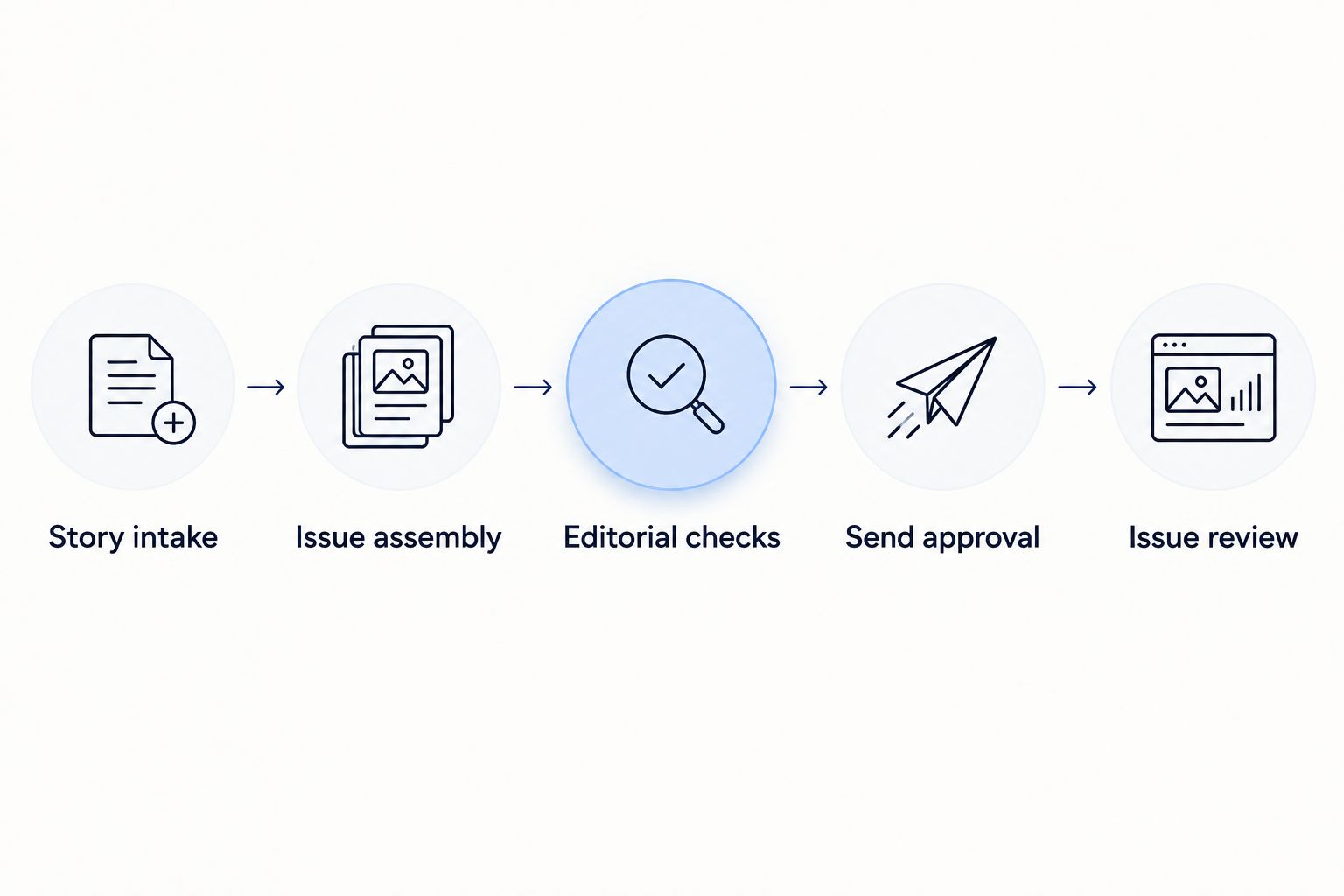
Automation needs a clear owner at each editorial handoff.
Copy this evaluation sheet into your team’s planning document. Fill it during the walkthrough, not from a feature page; the result should show which repeated tasks disappear and which remain.
| Evaluation field | What your team records | Passing condition |
|---|---|---|
| Story intake | Source, destination and remaining copying | Everyone knows how source material enters the issue workflow |
| Issue assembly | Required layout and editorial changes | The editor can produce the issue your readers expect |
| Editorial checks | Checks performed and responsible editor | No check depends on an unnamed person remembering it |
| Send approval | Approver and release decision | One named person owns the final decision |
| Issue review | Newsletter goal and next editorial change | The next issue has a specific improvement to make |
Keep a separate list of manual exceptions. An exception isn’t automatically a reason to reject a tool, but it must have an owner. Otherwise, automation simply moves unfinished work out of sight.
What should a multi-newsletter team check before switching?
Start with subscriptions, not just email addresses. One reader can belong to several newsletters, and your migration needs to preserve those choices without turning an unsubscribe into permission to send again.
For a worked planning example, use three newsletters and one reader subscribed to all three. Check that the destination represents the reader and all three subscriptions correctly; then repeat the exercise for a reader who unsubscribed from one newsletter but remains subscribed to another.
Also check these operational boundaries:
- Support: Identify which onboarding tasks your plan includes and which your team owns.
- Website connection: Confirm how stories enter the newsletter workflow.
- Approvals: Name the person who checks and releases each issue.
- Sending reputation: Plan for rebuilding reputation and IP warming when moving platforms.
A platform switch isn’t a promise of better inbox placement. Keep migration decisions separate from deliverability claims, and make the transition plan part of the buying decision.
Which newsletter automation tool should you choose?
Choose Letterhead when your main job is turning website publishing into a repeatable newsletter operation, particularly for a small media team running two to five newsletters. Choose Mailchimp when marketing journeys drive the requirements, Ghost when you’re choosing a membership-led publishing home, and Stripo when email design is the specific bottleneck.
For an undecided publisher in 2026, start with the current issue-production process, not the longest feature list. Select the tool that removes a repeated task while keeping editorial ownership clear.
FAQ
What’s the best newsletter automation tool for a small newsroom?
Letterhead is the strongest fit in this shortlist for a small newsroom publishing on a website and running several newsletters. Its verified workflow includes website story intake, a curations library, newsletter goals, send checks and portfolio promotions.
Is newsletter automation the same as marketing automation?
No. Newsletter automation addresses recurring publishing work, while marketing automation commonly organizes campaigns and triggered journeys. Compare the work you need completed rather than treating the labels as interchangeable.
Can newsletter automation choose and approve every story?
Keep story selection and final approval with your editorial team. Automating story intake or repetitive production tasks doesn’t remove responsibility for accuracy, relevance or the decision to send.
Should I replace my email platform just to improve newsletter design?
Not necessarily; evaluate a production tool first if design is the only bottleneck. Check the handoff to your existing sending platform before deciding that a full replacement is necessary.
How do I compare tools when readers subscribe to several newsletters?
Test one reader with several subscriptions and check how both the reader record and subscription choices are represented. Include a partial unsubscribe in the walkthrough so your evaluation covers more than the simplest case.
Will moving newsletter platforms improve deliverability?
A move doesn’t promise better inbox placement. Moving platforms means rebuilding sending reputation, so include IP warming and a transition plan in your evaluation.
What’s one last check before you decide?
Run the walkthrough with the person who builds the issue, not only the person buying the software. Ask the builder to identify the next manual step after every automated step; that exposes handoffs a feature checklist leaves out.
Which related guides should you read next?
By Letterhead