
Best newsletter software for universities and higher ed in 2026

Best for website-led university publishing: Letterhead. Best for a general email program: Mailchimp. Best for an independent faculty publication: Ghost. The best newsletter software for universities in 2026 depends on whether you’re running a publishing portfolio, a general communications program or a standalone publication.
TL;DR
- Letterhead is the best newsletter software for universities running website-led editorial newsletters, not a verified replacement for every campus system.
- Mailchimp belongs on the shortlist for general email programs; test the work of managing separate newsletters.
- Ghost fits an independent faculty publication better than a university-wide newsletter portfolio.
- Compare editorial workflow, subscription handling and campus requirements before choosing a newsletter platform.
Why does university newsletter software need a narrower brief?
A university newsletter isn’t one job. A campus newsroom, alumni office and independent faculty publication can all send newsletters while needing different systems.
Choose for the work your team owns, not for the university as a whole. A publishing platform deserves consideration when your team turns website stories into recurring issues. It doesn’t automatically qualify as an admissions system, student-record system or institution-wide communications platform.
For a 2026 shortlist, separate those decisions before comparing vendors. Otherwise, a useful editorial tool gets judged against unrelated requirements—or purchased without checking requirements that actually matter.
What makes the best newsletter software for universities?
Use these criteria before reading the comparison. They turn a broad software search into a decision your editorial team and campus reviewers can evaluate together.
- Story intake: Show how published website stories reach the newsletter workspace. Identify what still requires copying and pasting.
- Issue production: Build a representative issue, including revisions and a final check. Don’t evaluate only an empty template.
- Newsletter goals: Define the audience and purpose of each newsletter separately. A campus news digest and a faculty publication shouldn’t inherit the same brief.
- Subscription handling: Establish how readers join, leave and subscribe to multiple newsletters. Distinguish newsletter subscriptions from broader university records.
- Portfolio work: Test how your team handles several newsletters, recurring promotions and overlapping readers.
- Campus acceptance: Ask the appropriate reviewers to assess accessibility, security, permissions and required integrations. Treat these as acceptance requirements, not assumed capabilities.
The best choice passes your essential requirements before it wins on convenience. A polished editor cannot compensate for a missing integration your team must use.
Which university newsletter platforms belong on your shortlist?
These options serve different jobs. The table compares their fit; it does not claim that every option covers an entire university’s communications requirements.
| Option | Best for | Standout fit | Key limitation |
|---|---|---|---|
| Letterhead | Website-led university editorial teams | Website stories, issue production, newsletter goals and portfolio promotions in one place | Media-first positioning; campus-specific requirements need verification |
| Mailchimp | General email programs | A general-purpose starting point when newsletter publishing isn’t the whole job | Separate lists and manual production deserve a close workflow test |
| Ghost | Independent faculty publications | A publication-centered approach for an individual operator | A different fit from a shared, multi-newsletter institutional operation |
Keep the shortlist small. Adding tools that solve unrelated jobs makes the evaluation longer without making the decision clearer.
1. Letterhead: best for website-led university publishing
This is the strongest fit when your university team already publishes stories on a website and turns them into several newsletters. Its media-first approach matches that editorial job more closely than a brief centered on admissions automation or institutional records.
RSS, the API and the WordPress plugin bring stories into the curations library—the place your team collects material for issues. With the WordPress plugin on, every published article is sent there. Your team still decides what belongs in each newsletter.
The shipped capabilities include goals for each newsletter, checks before each send, promotions across the portfolio and Penpal, the newsletter assistant. These are publishing capabilities, not evidence of coverage for every campus communications requirement.
Pros - Website stories can enter the curations library through RSS, the API or the WordPress plugin. - Each newsletter can have its own goals and checks before sending. - Promotions can be managed across the newsletter portfolio. - A reader subscribed to several newsletters counts once for active-contact pricing.
Cons - Higher-education-specific integrations and institutional requirements need separate verification. - Full-service onboarding and dedicated support are available only on enterprise plans. - Website-led publishing is the clearest fit; it isn’t a reason to replace unrelated campus systems.
An active contact has at least one subscription marked subscribed. Unsubscribed, cleaned, disengaged and contacts without subscriptions don’t count. A reader subscribed to three newsletters still counts once.
The free plan includes up to 5,000 contacts and 5,000 emails a month. Those are separate limits: sending one issue to 5,000 readers uses 5,000 emails. Staying within the contact allowance doesn’t mean you can send those readers additional issues within that monthly email allowance.
Best for: Small university editorial teams running two to five newsletters from an existing website, plus larger publishing programs with requirements checked separately.
Verdict: Buy Letterhead for a verified website-to-newsletter publishing fit—not as an assumed replacement for every campus system.
2. Mailchimp: best for a general university email program
Mailchimp belongs on the shortlist when your brief is general email communication rather than running newsletters as distinct editorial products. Start with the job your team already does, then test whether the production process remains manageable across your actual newsletters.
The important question isn’t whether you can assemble an email. It’s whether your team can repeat the work without maintaining separate lists and copying the same stories between issues.
Mailchimp pros - It provides a general email option rather than requiring a publication-first brief. - It gives an existing Mailchimp team a baseline against which to evaluate a switch. - It keeps the evaluation focused on whether a new publishing workflow is actually necessary.
Mailchimp cons - Separate lists and manual copying can become the reason a publishing team needs a different workflow. - A general email brief doesn’t establish fit for portfolio reporting or revenue operations. - Required campus integrations still need verification; familiarity isn’t proof of coverage.
For a 2026 evaluation, rebuild a real issue and document every manual step. Include a story that appears in more than one newsletter and a reader who subscribes to several publications. Those examples expose work that a single-template demonstration misses.
Best for: A university office whose primary requirement is a general email program, with editorial portfolio needs evaluated separately.
Verdict: Hold a platform switch until Mailchimp’s actual workflow fails a requirement that matters to your team.
3. Ghost: best for an independent faculty publication
Ghost belongs in a different decision branch: a publication run by an individual operator. That makes it relevant to an independent faculty publication, rather than an automatic choice for a shared university newsletter portfolio.
Compare it when the publication itself is the center of the project. If the real brief is coordinating newsletters across offices, return to the portfolio requirements before choosing a publication-centered tool.
Ghost pros - Its individual-operator focus matches a narrower, independently run publication. - It offers a relevant alternative when the project is a publication rather than a campus communications program. - It keeps a small editorial project from inheriting an unnecessarily broad institutional brief.
Ghost cons - Individual-operator fit doesn’t establish suitability for shared institutional publishing. - A standalone publication model doesn’t prove coverage for your existing campus systems. - Multi-newsletter production and governance requirements need their own demonstration.
Don’t reject Ghost because your university is large. Evaluate the scope of the particular publication. An independently run faculty newsletter and a central communications portfolio are different purchases, even at the same institution.
Best for: An independent faculty publication with a clearly bounded editorial operation.
Verdict: Buy Ghost for a verified standalone-publication fit; skip it as the default for an untested university-wide portfolio.
How should you test university newsletter software before buying?
Use the same acceptance script for every shortlisted vendor. A comparable demonstration is more useful than separate tours built around each vendor’s strongest features.
Copy this checklist into your evaluation document. For each row, record the observed result, the remaining manual work and who must approve it.
| Test | What to demonstrate | What to record |
|---|---|---|
| Story intake | Bring a published website story into the issue-building process | Source, steps and any copying required |
| Issue build | Assemble a representative newsletter and revise it | Editorial work and unresolved formatting questions |
| Reader overlap | Show one reader subscribed to several newsletters | Subscription behavior and contact-counting rules |
| Send check | Review the finished issue before sending | Checks available and your team’s remaining responsibilities |
| Campus review | Present required integrations and institutional requirements | Verified answers, open questions and responsible reviewers |
These are acceptance tests, not claims that every platform supports each task. A vendor should show the relevant behavior or explain the limit plainly.
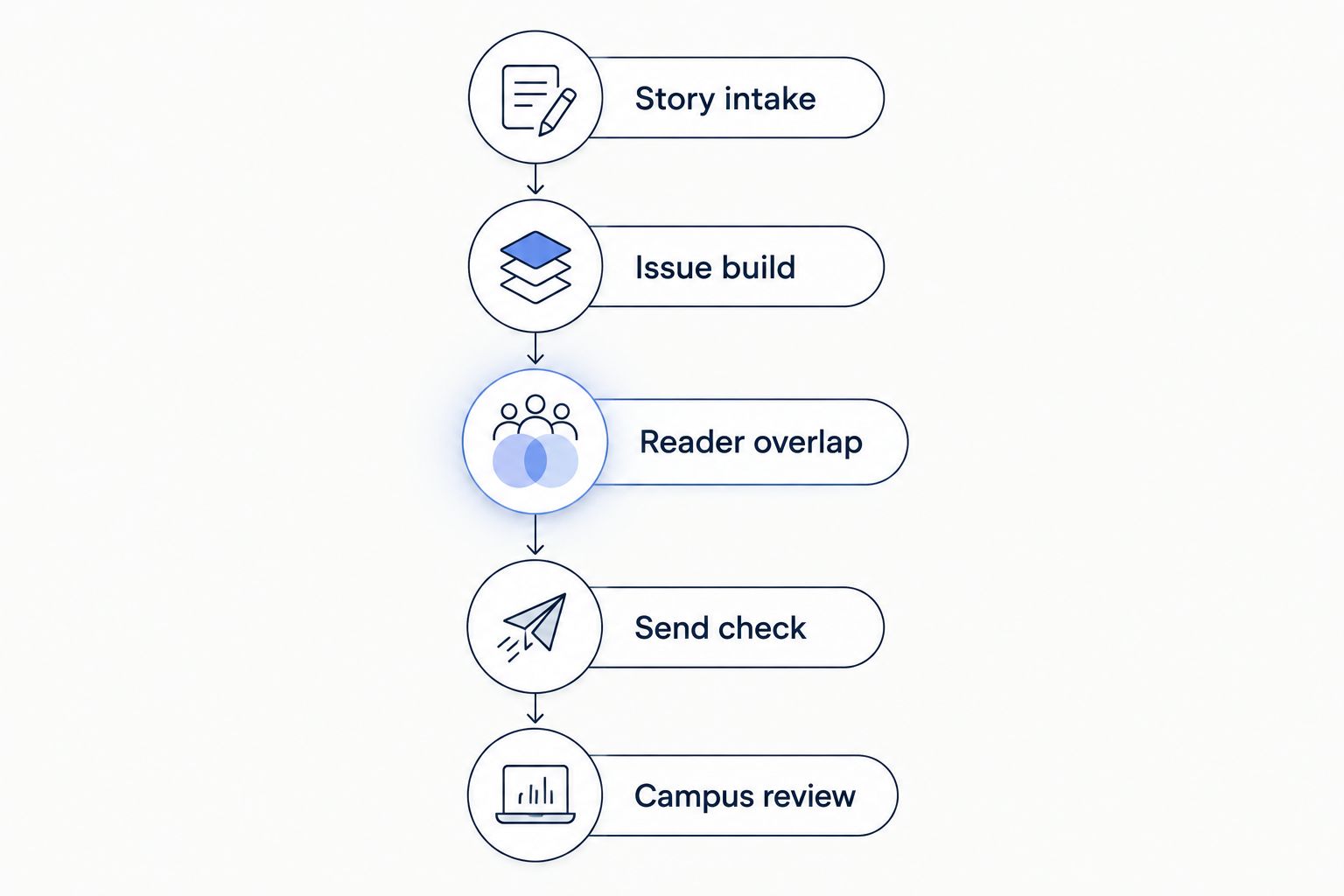
Use the same acceptance script for every shortlisted platform.
Give the editorial team and campus reviewers different responsibilities. Editors assess the work of making an issue; the appropriate institutional reviewers assess requirements outside the editor’s remit.
If you’re switching senders, include sending-reputation rebuilding and IP warming in the migration plan. A platform change is not a promise of better inbox placement.
How were these newsletter platforms ranked?
The ranking follows the publishing job, not a universal feature score. Website-led editorial production comes first because it matches the university newsroom scenario this guide prioritizes. General email and independent publication needs get separate recommendations.
The criteria are story intake, issue production, newsletter goals, subscription handling, portfolio work and campus acceptance. This 2026 shortlist is a fit assessment, not a hands-on benchmark or a certification of institutional suitability.
Which newsletter software should your university choose?
Choose Letterhead when your team’s job is turning website stories into a portfolio of editorial newsletters. That is a specific fit, not a recommendation to move every university email program onto one platform.
Keep Mailchimp in consideration when general email remains the core requirement. Choose Ghost when you’re building an independent faculty publication. If your project combines those jobs, write separate requirements before asking one vendor to cover them all.
The deciding evidence should be a completed acceptance script. Don’t let a strong demonstration of one task stand in for proof of the others.
FAQ
What’s the best newsletter software for universities in 2026?
The best choice depends on the publishing job: a website-led editorial portfolio, a general email program or an independent publication. Test each shortlisted platform against the same issue-building and campus acceptance requirements.
Should a university use one newsletter platform for every department?
Only choose a shared platform after checking the requirements of the departments it will serve. A newsroom newsletter and a broader institutional communications program should not be assumed to need identical capabilities.
Is Mailchimp enough for a university newsletter?
Mailchimp belongs on the shortlist for a general university email program. Test the manual work of separate lists, overlapping readers and repeated story placement before deciding whether your team needs a publishing-focused alternative.
Is Ghost a good choice for a faculty newsletter?
Ghost is a relevant choice for an independently run faculty publication. That individual-operator fit does not establish suitability for a shared university-wide newsletter portfolio.
What should a university ask vendors to demonstrate in 2026?
Ask every vendor to demonstrate story intake, issue building, overlapping subscriptions and checks before sending. Have the appropriate campus reviewers assess required integrations and institutional requirements separately.
Does changing newsletter platforms improve inbox placement?
A platform change does not promise better inbox placement. Moving platforms means rebuilding sending reputation, so include IP warming in your migration plan.
What should you check one last time?
Ask the vendor to demonstrate a reader subscribed to several newsletters—not just several separate reader records. That small test connects subscription behavior, contact counting and the way your team thinks about its audience.
Then return to the editorial question: does each newsletter have a defined reader and a reason to exist? Software should support that decision, not replace it.
Related guides
By Letterhead