
How long does it take to fix poor newsletter deliverability?

There’s no fixed timeline to fix newsletter deliverability: correcting a broken sending setup and rebuilding a damaged sending reputation are different jobs. A configuration change addresses the fault, but it doesn’t establish that your next issue will reach the inbox. Judge recovery by authentication results, provider responses and reader complaints—not a promised number of days.
TL;DR
- To fix newsletter deliverability, separate authentication faults from sending-reputation problems before setting a recovery deadline.
- Google’s Gmail guidance recommends keeping reported spam rates below 0.1%; that threshold isn’t a recovery timetable.
- Letterhead fits media teams running multiple newsletters; changing platforms doesn’t erase a damaged sending reputation.
- Restart with permission-based, engaged audiences and expand only when provider responses support it.
Why does the recovery timeline matter?
A newsroom still has stories to publish while its email program is struggling. That pressure makes a quick technical fix attractive, especially when your team has several issues scheduled and sponsors expecting placements.
But a repaired setting and a recovered audience are different milestones. If you declare success after changing a DNS record, you can miss continued deferrals, complaints or spam-folder placement. DNS records are the published settings receiving systems use to check your sending identity.
Letterhead gives newsletter teams one place to run their newsletters. That production job matters, but it’s separate from proving that a receiving provider accepts and places your mail as intended.
For a 2026 recovery plan, replace “When will this be fixed?” with “Which fault is confirmed, and what evidence will show that it’s resolved?” That gives your team a decision it can act on.
How long does it take to fix poor newsletter deliverability?
The recovery period depends on the cause; there’s no defensible universal deadline. Start by identifying whether messages fail authentication, receive delivery errors, or get accepted without reaching the inbox.
An accepted message isn’t proof of inbox placement. A receiving server can accept mail and then place it in spam, so a delivery-rate report alone doesn’t answer the question.
| Confirmed problem | Best next action | What that action resolves | What it doesn’t prove |
|---|---|---|---|
| Authentication failure | Correct the sending configuration and verify a new message | Whether the message passes the relevant identity checks | Whether reputation or inbox placement has recovered |
| Temporary provider deferrals | Read the response codes and review sending volume | The reason the provider gives for delaying acceptance | That retrying at the same volume is appropriate |
| Elevated reader complaints | Investigate acquisition sources, expectations and affected newsletters | Which sending practices need to change | That a cleaned list immediately restores reputation |
| Accepted messages reaching spam | Review reputation signals and recipient-side evidence | Whether acceptance is being confused with inbox placement | A recovery date shared by every mailbox provider |
| A recent platform or IP change | Verify authentication and plan warming where applicable | Whether the new sending setup is ready for controlled sending | That the old sender’s reputation transfers intact |
This table is a diagnostic guide, not a set of service-level promises. Each row requires evidence from your own sending setup and the providers receiving your mail.
Can an authentication fix restore inbox placement immediately?
An authentication fix resolves an identity problem, not every reason a provider filters mail. SPF identifies authorized sending infrastructure; DKIM adds a verifiable signature; DMARC checks alignment with the visible From domain and publishes handling policy.
Check the headers of a newly sent message after making changes. A settings screen showing the intended configuration isn’t the same as a receiving system reporting that the message passed.
Does a damaged sending reputation take longer to repair?
Reputation repair requires new sending behavior and provider evidence, rather than a single configuration change. Mailbox providers assess incoming mail independently, so progress at one provider doesn’t establish recovery elsewhere.
Keep separate records for Gmail, Yahoo and other destinations important to your readership. Otherwise, an overall delivery figure can hide an unresolved problem at the provider serving a substantial part of your audience.
What should you check before promising a recovery date?
Build a baseline before changing several things at once. Without one, you won’t know whether an improvement followed a configuration correction, a smaller audience or a different newsletter.
Use this 2026 incident worksheet for each affected newsletter. It’s a working template, not a claim about any platform’s reporting features.
| Record | What to write down | Decision it supports |
|---|---|---|
| Sending identity | From domain, signing domain and sending IP where available | Whether affected issues share infrastructure |
| Authentication | SPF, DKIM and DMARC results from received headers | Whether identity checks actually pass |
| Provider response | Exact rejection or deferral text | Whether the provider reports a technical or policy problem |
| Audience source | How readers subscribed and what they were promised | Whether the issue matches reader expectations |
| Newsletter scope | Which titles and audiences show the problem | Whether the incident is isolated or shared |
| Reader signals | Available complaints, unsubscribes, clicks and direct feedback | Whether the audience still wants the issue |
| Change log | What changed, when, and who owns the next decision | Whether you can connect an intervention to its result |
Preserve the exact error message rather than summarizing it as “delivery problem.” Different response codes require different actions; a temporary deferral and a permanent rejection aren’t interchangeable.
Use email deliverability tools to choose the checks your investigation needs. A tool’s usefulness depends on the question: authentication inspection, provider diagnostics and placement testing answer different things.
What should you fix first?
Follow the evidence in this order. Don’t start by rewriting subject lines when received headers show that the sender’s identity checks fail.
- Verify identity. Inspect authentication results on actual messages. Correct failed checks and verify again before treating the configuration as resolved.
- Read responses. Collect rejection and deferral details by provider. Separate messages that weren’t accepted from messages accepted into spam.
- Review permission. Examine signup sources, the subscription promise and whether readers still expect the newsletter. Don’t reintroduce unsubscribed readers to rebuild volume.
- Control sending. Remove the cause of unwanted mail and choose an audience with a clear subscription relationship. Plan IP warming when your infrastructure change calls for it.
- Check recovery. Review subsequent provider responses and reader signals before expanding. Keep the next change small enough that its effect remains understandable.
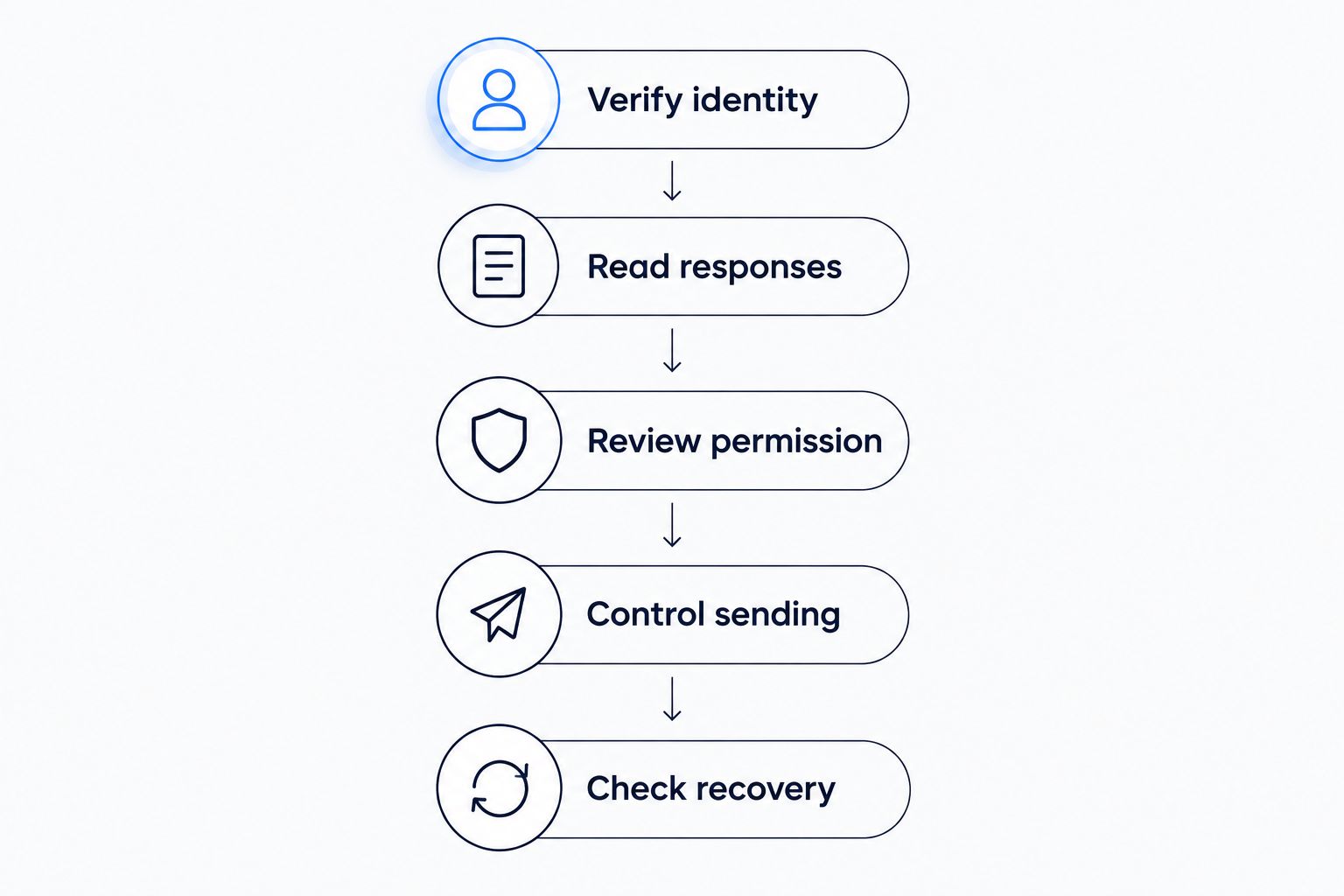
Resolve the confirmed fault before increasing the audience.
Don’t change platforms, domains, audience selection and sending volume together without documenting each change. You’ll make the next result harder to interpret, even if some of those changes are necessary.
Which Gmail numbers matter during recovery?
Google’s published Email sender guidelines for personal Gmail accounts recommend keeping user-reported spam rates below 0.1% and avoiding 0.3% or higher. These are provider-specific complaint guidelines, not industry averages or promised recovery thresholds.
Google also sets additional requirements for senders sending approximately 5,000 messages a day or more to personal Gmail accounts. Those bulk-sender requirements include SPF and DKIM authentication, DMARC, and applicable unsubscribe requirements.
For your 2026 checklist, use Google’s Email sender guidelines as the source for Gmail requirements. Don’t apply a Gmail-specific figure to your entire subscriber database and call it a universal benchmark.
Also distinguish a provider’s reported spam rate from a percentage calculated using all your sends. Different scopes and denominators produce different figures; label the source alongside the number in your incident record.
Meeting a threshold doesn’t certify inbox placement. Treat it as one requirement within a wider investigation, not permission to resume your previous volume automatically.
Why does newsletter deliverability recovery vary?
The following factors change the work required. None supports a fixed recovery promise by itself.
- The confirmed cause. A failed authentication check has a specific technical correction. Unwanted mail requires changes to the audience or subscription experience.
- The receiving provider. Providers apply their own filtering and acceptance decisions. Keep their results separate.
- The audience’s expectations. A valid address doesn’t establish that its owner wants a particular newsletter. Review the subscription promise and frequency.
- The infrastructure involved. A platform or IP change creates a different sending situation. Account for reputation rebuilding and IP warming where relevant.
- The evidence available. Headers, response codes and provider reporting narrow the diagnosis. An aggregate open rate cannot substitute for those records.
- The changes made during recovery. Several simultaneous changes make it harder to identify what worked and whether the underlying fault remains.
Your publishing calendar also needs an explicit owner during an incident. Someone must decide which issues proceed, which audiences receive them and what evidence permits expansion. Don’t leave that decision to whoever finishes building the issue first.
Should you switch newsletter platforms to fix deliverability?
Switch for a verified capability or workflow need, not to escape sending reputation. Moving platforms means rebuilding sending reputation; plan for IP warming where applicable. A new account doesn’t correct poor permission practices or make unwanted mail welcome.
Letterhead is best for media teams that already publish on a website and need one place to run multiple newsletters. Its curations library, newsletter goals, checks before each send and portfolio promotions address publishing work; they don’t promise inbox placement.
That distinction is the limit to understand before a switch. Full-service onboarding and dedicated support are available on enterprise plans only, so don’t assume every migration includes a done-for-you recovery project.
If you’re evaluating a move in 2026, write down your required capabilities before comparing platforms. Keep the incident diagnosis separate from the buying decision, even when both projects happen together.
How do you decide when to expand sending again?
Set decision criteria before the next issue goes out. Otherwise, the pressure to return to the normal schedule can become your only definition of recovery.
Use this restart checklist:
- Authentication passes on newly received messages.
- The confirmed cause has a documented correction and an owner.
- Rejection and deferral responses have been reviewed by provider.
- Audience selection respects subscription status and reader expectations.
- Complaint reporting is checked using the provider’s stated scope.
- The next audience expansion has an explicit review point.
A 2026 recovery log should say what improved and what remains unresolved. “Authentication passes; Gmail deferrals remain under investigation” is more useful than “Deliverability fixed.”
Expand because the evidence supports it, not because a waiting period has expired. If the signals disagree, keep the diagnosis open.
FAQ
Can I fix newsletter deliverability in a day?
There’s no universal one-day fix for newsletter deliverability. Correcting a configuration fault doesn’t establish that sending reputation or inbox placement has recovered.
Does passing SPF, DKIM and DMARC mean my newsletter will reach the inbox?
Passing SPF, DKIM and DMARC doesn’t guarantee inbox placement. Authentication verifies aspects of sending identity; providers also make filtering decisions based on other signals.
Should I stop sending every newsletter during a deliverability problem?
A deliverability problem doesn’t by itself establish that every newsletter needs the same response. Identify the affected providers, audiences and sending infrastructure before deciding what to pause or continue.
Will moving to Letterhead fix my sending reputation?
Moving to Letterhead doesn’t erase a damaged sending reputation. Evaluate its newsletter publishing workflow separately, and plan reputation rebuilding and IP warming where applicable.
What spam complaint rate should I watch for Gmail?
Google recommends keeping reported spam rates below 0.1% and avoiding 0.3% or higher for personal Gmail accounts. Use the provider’s reporting scope rather than treating those figures as a universal list-wide benchmark.
How will I know my newsletter deliverability is improving?
Improvement requires evidence from authentication results, provider responses and reader signals. Accepted messages alone don’t prove inbox placement, so keep acceptance and placement separate in your recovery review.
What’s the last check before calling the incident resolved?
Send yourself the incident summary without the word “deliverability.” If it no longer explains what failed, the diagnosis is still too broad.
Name the fault, the correction and the evidence supporting your next send. That record will help more during the next incident than a promise that recovery always takes a certain number of days.
Related guides
By Letterhead