
Best Moosend alternatives for small publishers in 2026

Moosend is a capable email marketing tool with solid automation. It stops fitting when you publish on a website and run several newsletters that need production workflow, goals and portfolio-level reporting. The best Moosend alternative in 2026 is Letterhead if you publish stories on a website and run two to five newsletters; Mailchimp if you want a familiar general-purpose tool; beehiiv if one person runs one newsletter.
TL;DR
- Best Moosend alternatives in 2026 for small publishers: Letterhead, Mailchimp, beehiiv, Constant Contact and HubSpot.
- Letterhead fits publishers with a website and two to five newsletters; its free plan covers 5,000 contacts.
- Mailchimp is the lowest-friction move if your team already knows it.
- beehiiv suits individual operators, not multi-newsletter media teams.
- Staying on Moosend is fine if your sending is mostly promotional automation.
Why do small publishers look for Moosend alternatives?
Moosend is built around email marketing: lists, automation workflows and campaigns. That works well for a business that sends promotions to customers. Publishing is a different job.
A small publisher has stories going up on a website every day. Those stories need to end up in issues. Each newsletter needs its own audience, its own goal and a check before it goes out. Sponsors want reports. When the tool only knows about lists and campaigns, your team fills the gaps by hand: copying headlines, pasting links, keeping a spreadsheet of what ran where.
That manual work is the real reason teams switch. Sending an email is a commodity. Running three newsletters without losing a Monday morning to copy-paste is not.
Moosend alternatives at a glance
Pricing changes often, so check each vendor’s site for current plans. This table covers fit, not cost.
| Tool | Best for | Standout | How it differs from Moosend |
|---|---|---|---|
| Moosend | Promotional email and automation | Automation workflows | The benchmark: email marketing first |
| Letterhead | Publishers running two to five newsletters from a website | Stories flow into issues; goals, send checks, portfolio promotions | Built for newsletter production, not general email marketing |
| Mailchimp | Teams that want a familiar, general-purpose tool | Broad market familiarity | Similar category, larger ecosystem |
| beehiiv | Individual operators with one newsletter | Creator-focused publishing | A creator platform, not a multi-newsletter team tool |
| Constant Contact | Small organizations sending event and promotional email | Straightforward campaigns | Same general-purpose category |
| HubSpot | Teams that want newsletters inside a CRM | Marketing and sales data in one system | A CRM first, newsletter tool second |
1. Letterhead: best for publishers running two to five newsletters
Letterhead is one place to run every newsletter your team sends. It’s built primarily for media, from independent publishers to large organizations with many brands. Small teams running two to five newsletters, often coming off Mailchimp and separate lists, are a core fit.
Stories come in through RSS, the API or the WordPress plugin and land in the curations library. With the plugin on, every published article is sent there. You build issues from that library instead of copying links by hand. The newsletter assistant, Penpal, helps with the work. Your team still reviews and approves everything.
Where Letterhead shines
- Stories from your website sit in one library, ready to pull into any newsletter.
- You set goals for each newsletter and check each send before it goes out.
- You manage promotions across every newsletter you run, not one list at a time.
- Pricing is based on active contacts. A contact is active when they have at least one subscription marked subscribed, so a reader on three newsletters counts once.
- The free plan includes up to 5,000 contacts and 5,000 emails a month. No credit card is needed to sign up.
Where Letterhead falls short
- It pays off most for teams that already publish on a website. If you write straight into the email editor with no site behind it, you’ll use less of it.
- It isn’t a store-focused tool. If your email is mostly product promotions, Moosend’s focus fits better.
- Full-service onboarding and dedicated support are enterprise-only. On self-serve plans, you do the move yourself.
- Switching platforms means rebuilding your sending reputation. Plan for IP warming and don’t expect the move to change where your emails land.
Best for: small publishers with a website and two to five newsletters.
| Letterhead | Moosend | |
|---|---|---|
| Main job | Run every newsletter your team sends | Email marketing and automation |
| Website stories | RSS, API and WordPress plugin feed a curations library | Not the core workflow |
| Multiple newsletters | Goals, send checks and promotions across the portfolio | Managed as lists and campaigns |
| Billing basis | Active contacts; a reader on several newsletters counts once | Check Moosend’s current plans |
Verdict: Buy if your newsletters come from a website. For more on how newsletter tools handle local and regional outlets, see newsletter software for local news outlets.
2. Mailchimp: best for teams that want a familiar tool
Mailchimp is the default for a reason. Most marketers have used it, templates are easy to find and plenty of tools connect to it. If your team already knows it, moving there from Moosend is the lowest-friction change.
Where Mailchimp shines
- Wide familiarity, so hiring and handoffs are easy.
- A large ecosystem of integrations and templates.
Where Mailchimp falls short
- It has the same ceiling Moosend does for publishers. Teams with several newsletters end up with separate lists and manual copying between them.
- Production workflow and portfolio reporting are things you assemble yourself.
Best for: teams that want a well-known general-purpose tool and send one or two simple newsletters.
| Mailchimp | Moosend | |
|---|---|---|
| Category | General-purpose email marketing | General-purpose email marketing |
| Learning curve | Familiar to most teams | Newer to most teams |
| Publisher workflow | Manual | Manual |
Verdict: Hold. It’s a lateral move unless familiarity is your main goal. If Mailchimp is on your shortlist, the Mailchimp alternatives for publishers guide covers where teams outgrow it.
3. beehiiv: best for individual operators
beehiiv is a different category. It’s built for individual operators who write and grow a newsletter as their business, and it does that well. Letterhead’s own audience is media teams, so beehiiv is the honest pick for a solo writer starting from nothing.
Where beehiiv shines
- Designed around one person building one audience.
- Publishing and growth features aimed at creators.
Where beehiiv falls short
- A media team with a website and several newsletters needs shared workflow and portfolio-level views, which is a different job.
- Moving a team of editors onto a creator-first platform means working against its grain.
Best for: a single writer running a single newsletter.
| beehiiv | Moosend | |
|---|---|---|
| Built for | Individual newsletter operators | Marketers sending campaigns |
| Team and portfolio use | Not the focus | Not the focus |
Verdict: Buy if you’re a solo writer. Skip if you’re a newsroom. Media teams weighing it should read beehiiv alternatives for media companies.
4. Constant Contact: best for small organizations sending event email
Constant Contact is a long-standing general-purpose email tool for small organizations: event invitations, announcements and regular campaigns. It’s a reasonable choice when email is one part of a small organization’s communication, not the product.
Where Constant Contact shines
- Straightforward campaign sending without much setup.
- Suits small organizations that email occasionally.
Where Constant Contact falls short
- It’s the same general-purpose category as Moosend. Publisher needs like story intake and portfolio goals aren’t its focus.
Best for: small organizations sending event and announcement email.
Verdict: Hold. It solves a problem you probably don’t have.
5. HubSpot: best for teams that need newsletters inside a CRM
HubSpot puts email next to contact records, sales data and marketing automation. If your newsletter exists mainly to feed a sales pipeline, having it in the same system makes sense. The trade is that the newsletter becomes one feature of a much larger platform.
Where HubSpot shines
- One system for marketing, sales and contact data.
- Useful when newsletter readers need to be tied to deals.
Where HubSpot falls short
- A publisher with no sales team pays for a CRM it doesn’t use.
- Newsletter production workflow isn’t the center of the product.
Best for: B2B teams whose newsletters feed a sales pipeline.
Verdict: Skip for a small publisher unless a CRM is already in your stack.
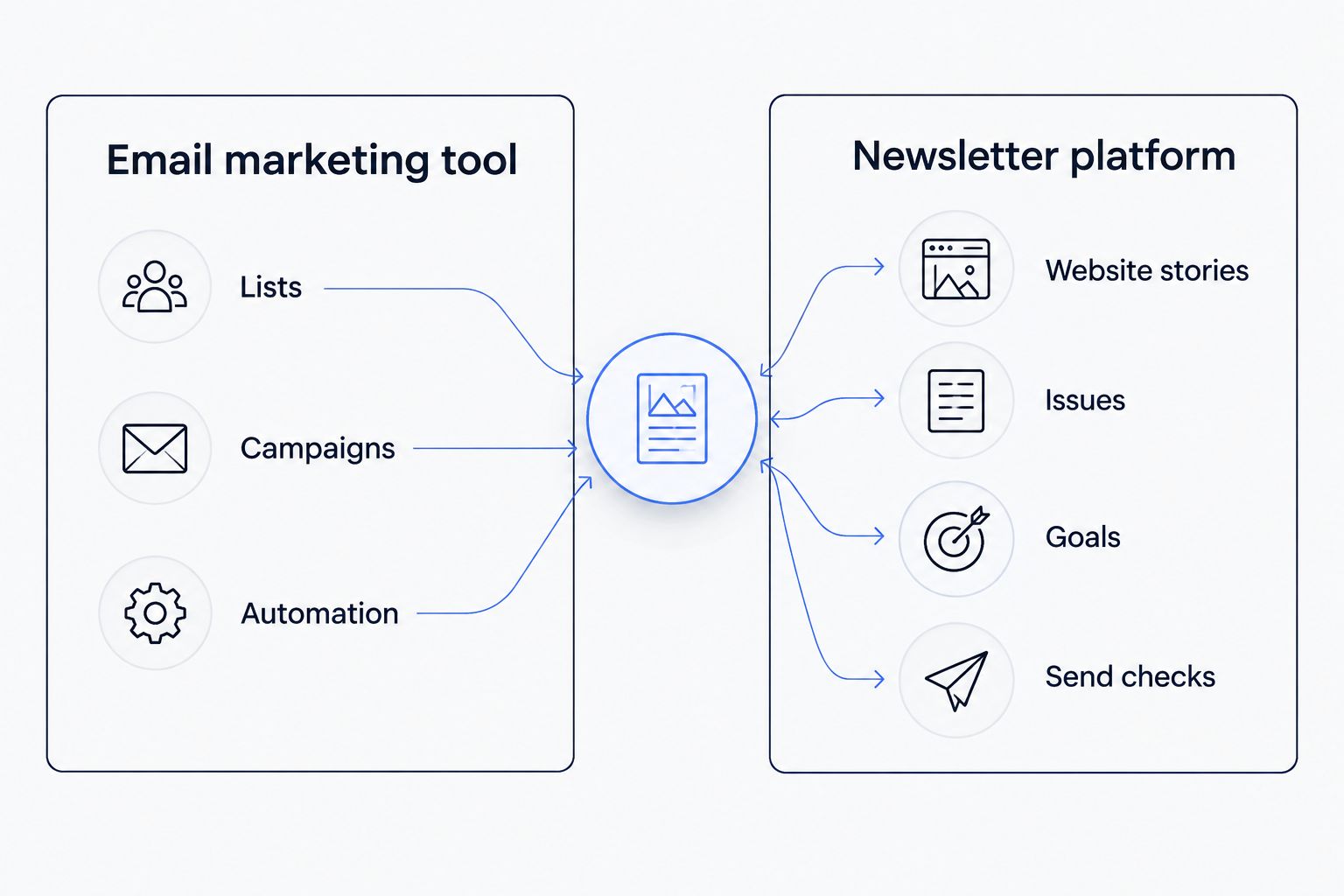
Email marketing tools center on lists and campaigns; newsletter platforms center on stories and issues.
What should you ask before you switch from Moosend?
Four questions settle most of it:
- Where do your stories start? If they’re published on a website first, pick a tool that pulls them in.
- How many newsletters do you run? Two to five is where separate lists and manual copying start to cost real hours.
- Who counts as a contact? Pricing models differ. Under Letterhead’s, someone subscribed to three of your newsletters counts once.
- Who does the move? On self-serve plans, you do. Budget time for rebuilding sending reputation and warming a new IP.
For a side-by-side on cost structures across the category, see newsletter platforms ranked by pricing.
Why do people switch from Moosend?
The reasons we hear most from small publishers are about fit, not quality:
- Newsletters come from website stories, and there’s no direct path from the site into an issue.
- Several newsletters mean several lists, with the same readers repeated across them.
- Sponsors want reports, and the team builds them by hand.
- Nobody checks a send in a consistent way before it goes out.
None of that makes Moosend a bad tool. It was designed for a different job.
When should you stay on Moosend?
Stay if your email is mainly promotional automation: welcome series, cart reminders, product launches. Stay if you run one newsletter, your team is happy with the workflow and nobody is copying and pasting stories. Switching costs real time, including rebuilding sending reputation. Don’t pay it to solve a problem you don’t have.
FAQ
What is the best Moosend alternative for small publishers in 2026?
Letterhead is the best fit for publishers with a website and two to five newsletters. Mailchimp is the easiest lateral move, and beehiiv suits solo operators.
Is there a free Moosend alternative?
Yes. Letterhead’s free plan includes up to 5,000 contacts and 5,000 emails a month, with no credit card needed to sign up. Other tools have their own free tiers, so check each vendor’s current plan.
How does Letterhead count contacts?
Letterhead bills on active contacts. A contact is active when they have at least one subscription marked subscribed. A reader subscribed to three newsletters counts once.
Can I bring website stories into my newsletter automatically?
With Letterhead, yes. RSS, the API and the WordPress plugin send stories into the curations library. With the plugin on, every published article goes there, and your team builds issues from it.
Will switching platforms change where my emails land?
No platform can promise that. Moving means rebuilding your sending reputation, so plan for IP warming and ramp volume gradually.
Does Letterhead offer full-service onboarding?
Full-service onboarding and dedicated support are available on enterprise plans only. On other plans, your team handles the move.
Is beehiiv a good Moosend alternative for a newsroom?
Usually not. beehiiv is built for individual operators, while newsrooms need shared workflow across several newsletters.
One last thing
Count your newsletters and your lists. If the second number is bigger than the first, readers are repeated across lists and you’re paying for the overlap in time as well as money. That overlap is the clearest sign your tool is built for campaigns, not newsletters.
See how Letterhead works
One place to run every newsletter your team sends.