
Best Omnisend alternatives for newsroom teams in 2026

Omnisend is built for ecommerce, so most newsroom teams outgrow it quickly. The best Omnisend alternatives for newsroom teams in 2026 are Letterhead for teams running several newsletters off a website, Mailchimp for a familiar general-purpose sender, beehiiv for individual operators, and Ghost for publishers who want the site and the newsletter in one system.
TL;DR
- Omnisend is built around online stores. Newsroom teams usually need story intake, issue production and sponsor reporting instead.
- Letterhead fits media teams running two to five or more newsletters from a website. Its free plan covers up to 5,000 contacts.
- Mailchimp is the lowest-friction move. It is also where separate lists and manual copying tend to start.
- beehiiv and Ghost suit individual operators and single-brand publishers. Both are good at that job.
- Any platform move means rebuilding sending reputation in 2026. Plan for IP warming before you cut over.
Why look past Omnisend as a newsroom team?
Omnisend does its job well: it connects to a storefront, reads product and order data, and triggers email and SMS around carts, browsing and purchases. That is a sound design for a shop.
A newsroom has a different raw material. Your input is stories on a website, not a product catalog. Your output is an issue that people read, and your revenue questions are about sponsors and subscribers, not baskets.
The ceiling shows up when a team starts running more than one newsletter. Each newsletter needs its own audience, its own goals and its own checks before it goes out. Storefront-first tools don’t organize work that way, so the team ends up building around the tool.
That is a mismatch of fit, not a flaw in Omnisend. If you sell products and send newsletters, Omnisend may still be the right tool for the shop side.
What should a newsroom team need from an Omnisend alternative?
Five jobs decide the choice. Score every candidate against them before you look at anything else.
- Story intake. Can stories from your website land in the newsletter tool without copy and paste?
- Issue production. Can an editor build an issue from those stories, with a review step before it sends?
- More than one newsletter. Can you run two, five or twenty newsletters without separate lists and separate logins?
- Sponsor reporting. Can you show a sponsor their placements, impressions and clicks without a spreadsheet?
- Pricing you can predict. Do you pay for the readers you actually mail, or for list size in a way that double-counts people?
The broader guide to newsletter software for newsrooms covers these five jobs in more depth.
Omnisend alternatives at a glance
| Tool | Best for | Standout trait | How it differs from Omnisend |
|---|---|---|---|
| Omnisend | Online stores sending email and SMS | Storefront data drives automation | The baseline: built for ecommerce |
| Letterhead | Media teams running several newsletters off a website | One place to run every newsletter | Built for publishing work, not shop automation |
| Mailchimp | Teams that want a familiar general-purpose sender | Broad familiarity | General-purpose, not ecommerce-first |
| beehiiv | Individual operators and creators | Built for one person running a newsletter | Operator-first, not storefront-first |
| Ghost | Publishers who want site and newsletter together | Publishing platform with newsletters built in | The website is the center, not the shop |
Pricing is not in the table on purpose. Plans change, so check each vendor’s current page.
1. Letterhead: best for media teams running several newsletters
Letterhead gives newsletter teams one place to run every newsletter they send. It is built primarily for media, from independent publishers to large organizations with many brands. It pays off most when you already publish on a website.
RSS, the API and the WordPress plugin bring stories into the curations library. With the plugin on, every published article is sent there. From the library, your team builds issues, sets goals for each newsletter, checks each send and manages promotions across the portfolio. Penpal, the newsletter assistant, helps along the way. Your team reviews and approves every issue.
Where Letterhead shines
- Story intake from your own website through RSS, the API or the WordPress plugin.
- Goals for each newsletter, so you know what better looks like for each one.
- Checks before each send, so errors get caught before readers see them.
- Promotions managed across the whole portfolio, not newsletter by newsletter.
- Pricing based on active contacts. A contact is active when they have at least one subscription marked subscribed, so a reader on three newsletters counts once.
- A free plan with up to 5,000 contacts and 5,000 emails a month. No credit card is needed to sign up.
Where Letterhead falls short
- It is a newsletter tool, not a storefront tool. If you need cart recovery or product-triggered automation, it isn’t built for that.
- It pays off most for teams that already publish on a website. A team with no site gets less from the curations library.
- Full-service onboarding and dedicated support are available on enterprise plans only. Smaller teams do the switch themselves.
- The free plan has limits. Past 5,000 contacts or 5,000 emails a month you move to a paid plan.
Best for: media teams with a website and two to five newsletters, and larger organizations with many brands.
| Dimension | Letterhead | Omnisend |
|---|---|---|
| Where stories come from | Website, through RSS, API or WordPress plugin | Not the design center; storefront data is |
| Several newsletters | One place to run all of them | Built around a store, not a newsletter portfolio |
| What you pay for | Active contacts, counted once across newsletters | Check Omnisend’s current pricing page |
| Sponsor work | Promotions managed across the portfolio | Not the design center |
Verdict: Buy if your newsletters come from a website and you run more than one.
2. Mailchimp: best for a familiar general-purpose sender
Mailchimp is the tool many small teams already know. It sends email reliably, the interface is familiar, and there is little to learn on day one.
The ceiling arrives when the newsletter count grows. Teams commonly end up with separate lists per newsletter and copy stories over by hand. Nothing in a general-purpose sender organizes the production work of a newsroom.
Where Mailchimp shines
- Familiar to most marketers and freelancers, so hiring and handoff are easy.
- A general-purpose feature set that covers basic newsletters without setup.
Where Mailchimp falls short
- Separate lists per newsletter make portfolio-level work slow.
- Story intake from a website is a manual job.
- Sponsor reporting usually lives outside the tool.
Best for: a single newsletter, or a team that wants the lowest-friction move off Omnisend.
| Dimension | Mailchimp | Omnisend |
|---|---|---|
| Built for | General-purpose email | Ecommerce email and SMS |
| Newsletter production | Basic builder | Not the design center |
| Fit for newsrooms | Fine at one newsletter, strained at several | Storefront-first |
Verdict: Hold. Fine for one newsletter, but it gets tight at two to five.
The deeper comparison is in the guide to Mailchimp alternatives for publishers.
3. beehiiv: best for individual operators
beehiiv is built for people who run a newsletter themselves. It is a different category from a team tool, and it is good at that category.
If you are one writer building one audience, beehiiv does the job without the weight of a multi-brand platform. A newsroom with several editors and several newsletters is not what it was designed around.
Where beehiiv shines
- Designed for a single operator growing an audience.
- Straightforward setup for a creator-led newsletter.
Where beehiiv falls short
- A different fit from a newsroom running a portfolio of newsletters off a website.
- Team workflow across many brands is not its center.
Best for: independent writers and creator-led newsletters.
| Dimension | beehiiv | Omnisend |
|---|---|---|
| Built for | Individual newsletter operators | Online stores |
| Fit for newsrooms | Better for one voice than for a portfolio | Storefront-first |
Verdict: Hold for a newsroom. Buy if you are a solo operator. See the guide to beehiiv alternatives for media companies if you are weighing it.
4. Ghost: best for site and newsletter in one system
Ghost is a publishing platform with newsletters built in. If you are starting a site from scratch and want the website, memberships and email in one system, it is a clean fit.
The trade-off is that your newsletter work lives inside your site’s platform. A team that already runs a separate website, or several of them, has to adopt Ghost as the center before the newsletter side makes sense.
Where Ghost shines
- Website and newsletter in one publishing system.
- A good fit for an independent publisher starting fresh.
Where Ghost falls short
- You adopt the platform, not just a newsletter tool. That is a bigger move for a team with an existing site.
- A portfolio of newsletters across many brands is not its center.
Best for: single-brand publishers building a site and newsletter together.
| Dimension | Ghost | Omnisend |
|---|---|---|
| Built for | Publishing sites with newsletters | Online stores |
| Fit for newsrooms | Strong for one brand, a bigger move for existing sites | Storefront-first |
Verdict: Wait unless you are rebuilding your site anyway.
Why do newsroom teams switch away from Omnisend?
Three reasons come up for teams whose business is publishing.
- The input is stories, not products. A newsroom needs a path from its website to an issue. A product catalog does not help with that.
- One newsletter became several. Once a team runs two to five newsletters, it needs goals, checks and promotions managed across all of them.
- Sponsors ask for reports. Sponsors want placements, impressions and clicks. That is a publishing reporting job.
None of this makes Omnisend a poor tool. It is a tool for a different business.
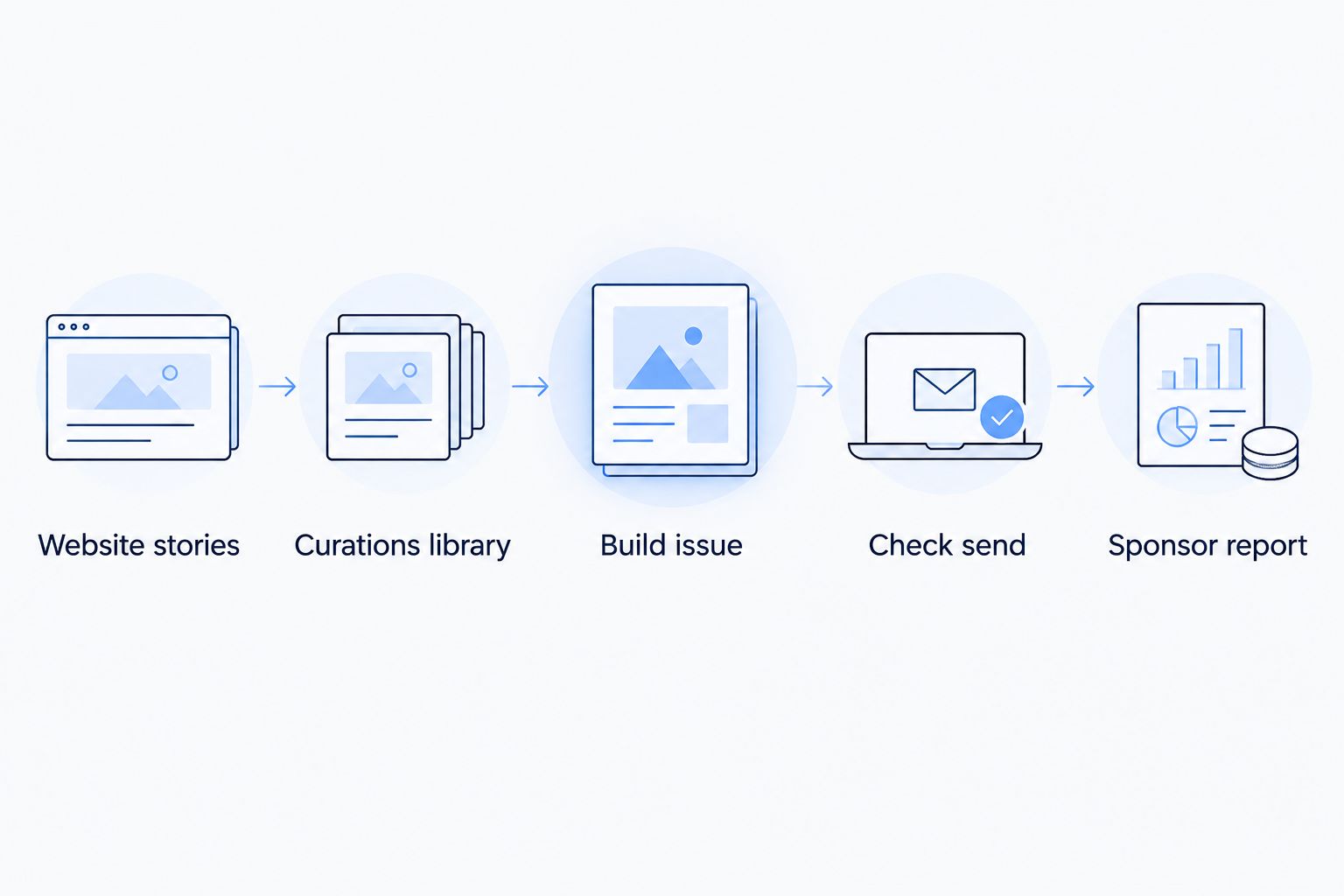
A newsroom workflow starts at the website, not at a product catalog.
What should you plan for when you switch platforms in 2026?
A move rebuilds your sending reputation. Mailbox providers judge a new sending setup from scratch, so plan for IP warming: start with your most engaged readers and raise volume gradually over several sends.
No platform can promise inbox placement, and any vendor that does is overselling. Set the expectation inside your team before the cutover, not after.
A short checklist for the switch:
- Export contacts and keep only readers with an active subscription.
- Move your most engaged readers first.
- Keep your old platform live until the new one has sent a few issues.
- Set a goal for each newsletter before the first send, so you can tell whether the move helped.
- Decide who reviews and approves each issue.
Teams that want to compare costs across tools can start with the guide to newsletter platforms ranked by pricing.
When is staying on Omnisend the right call?
Stay if your newsletter is really a store newsletter. If most of your sends are driven by product, cart or order data, and your readers are mostly buyers, Omnisend is doing the job it was built for.
Stay too if you run one small newsletter and the cost of moving, including the IP warming period, outweighs what you would gain. Switch when your work is production, portfolio and sponsors, which is where a storefront-first tool stops helping in 2026.
FAQ
What is the best Omnisend alternative for a newsroom?
Letterhead is the best fit for media teams that publish on a website and run several newsletters. Mailchimp suits a single newsletter, and beehiiv or Ghost suit individual operators and single-brand publishers.
Is Omnisend good for newsletters?
Omnisend is built for ecommerce, so it works best when sends are driven by store data. It is not designed around story intake, issue production or sponsor reporting.
Does Letterhead have a free plan?
Yes. The free plan includes up to 5,000 contacts and 5,000 emails a month, with no credit card needed to sign up.
How does Letterhead count contacts?
Pricing is based on active contacts. A contact is active when they have at least one subscription marked subscribed, so a reader on three newsletters counts once.
How do stories get into Letterhead?
RSS, the API and the WordPress plugin bring stories into the curations library. With the plugin on, every published article is sent there.
Will I land in more inboxes after switching?
No platform can promise that. Moving rebuilds your sending reputation, so plan for IP warming and start with your most engaged readers.
Who gets full-service onboarding?
Full-service onboarding and dedicated support are available on Letterhead enterprise plans only. Other teams set up the move themselves.
One last thing
Pick the tool by the work your team does every week, not by the feature list. If that work is turning website stories into issues across more than one newsletter, test a publishing-first platform on the free plan before you commit, and keep Omnisend running for the store side if you have one.